

This is the latest version
2.1.0.68.0 90.2 k
 9.96 MB
 5.0+
5.0+
Screenshots
Description of Xiaomi Notifications
Xiaomi Notifications is Xiaomi's offical app to manage notifications for Xiaomi, POCO and Redmi devices. Thanks to it, you can interact with all the app notifications you get on your device.
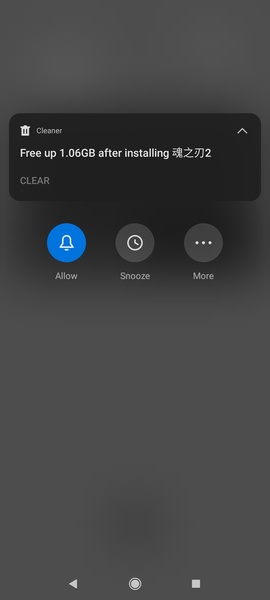
On Android, when you receive a notification, you get a floating dialog for a few seconds. Once it disappears, you can go to the notifications panel and interact with it. Each app features its own options within the notification. For instance, within a Gmail notification, you can reply to an email message, archive it or delete it, whereas within messaging apps, you can directly reply to a chat.
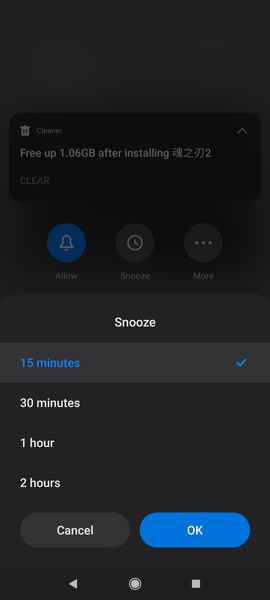
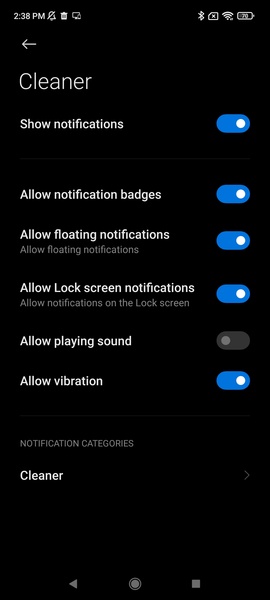
If you press and hold the app's notification, you can choose whether you want that app to show you notifications or not. You can also postpone it so that you are reminded about the notification later —you can choose intervals of 15, 30, 60 or 120 minutes. Moreover, you can access the notifications' advanced settings for more detailed and specific parameters.
Xiaomi also allows you to turn a notification into a floating one. This means you can interact with it and make it disappear when you don't want it to be shown anymore.
So, to sum up, if you want to interact with notifications on your Xiaomi, it'll be essential to download Xiaomi Notifications's APK.
On Android, when you receive a notification, you get a floating dialog for a few seconds. Once it disappears, you can go to the notifications panel and interact with it. Each app features its own options within the notification. For instance, within a Gmail notification, you can reply to an email message, archive it or delete it, whereas within messaging apps, you can directly reply to a chat.
If you press and hold the app's notification, you can choose whether you want that app to show you notifications or not. You can also postpone it so that you are reminded about the notification later —you can choose intervals of 15, 30, 60 or 120 minutes. Moreover, you can access the notifications' advanced settings for more detailed and specific parameters.
Xiaomi also allows you to turn a notification into a floating one. This means you can interact with it and make it disappear when you don't want it to be shown anymore.
So, to sum up, if you want to interact with notifications on your Xiaomi, it'll be essential to download Xiaomi Notifications's APK.







Xiaomi Notifications - APK Information
APK Version
2.1.0.68.0
Package Name
com.miui.notification
License
Free
Op. System
Android
Category
General
Languages
Afrikaans, Amharic, Arabic, Armenian, Belarusian, Bulgarian, Catalan, Chinese, Croatian, Czech, Danish, Dutch, English, Estonian, Farsi, Finnish, French, German, Greek, Hebrew, Hindi, Hungarian, Icelandic, Italian, Japanese, Kazakh, Korean, Latvian, Lithuanian, Malay, Norwegian, Polish, Portuguese, Romanian, Russian, Serbian, Slovak, Slovenian, Spanish, Swahili, Swedish, Tagalog, Thai, Turkish, Ukrainian, Vietnamese, Zulu
Developer
Xiaomi Inc.
Downloads
90,247
Date
Sep 4th, 2022


