Dev Bug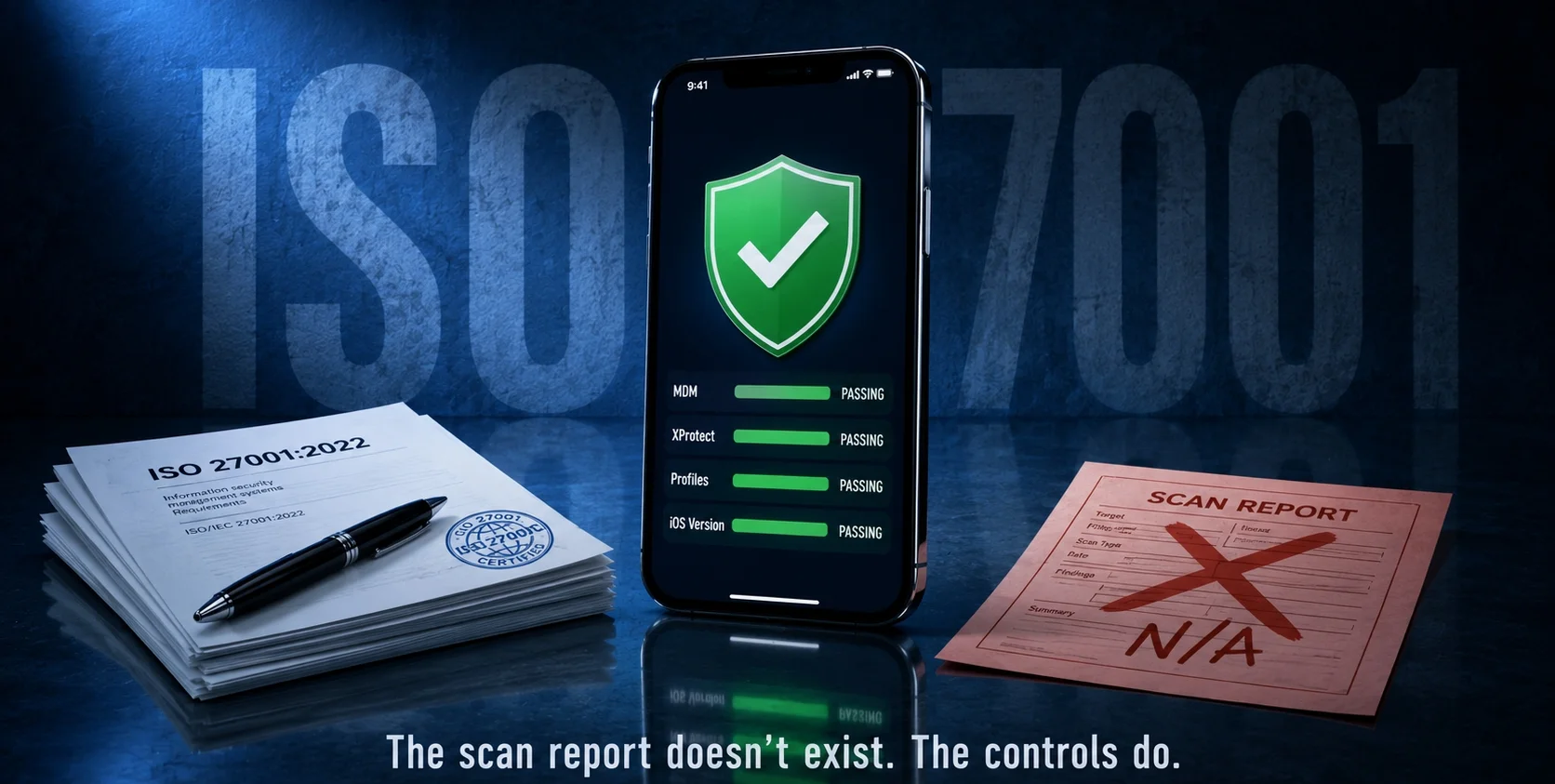
There is no malware scanner for iPhone — not because Apple missed something, but because iOS was architecturally designed to make one unnecessary. Under ISO 27001:2022, “scanning” an iPhone means something completely different: a layered checklist of configuration checks, MDM compliance reports and behavioural monitoring. This is exactly what that checklist looks like in practice.
The App Store Is Not a Security Guarantee — And That’s Where Most Audits Start
Every client we’ve walked through an iOS security audit makes the same assumption coming in: the App Store vets everything, so the apps on their iPhones are clean. Audit closed.
It’s not that simple.
The App Store review process catches a significant amount of known malware — but it is not a continuous runtime monitor. An app that passes review today can behave differently tomorrow, after an update or after a server-side configuration change that Apple never sees. More critically, enterprise-distributed apps — apps installed via provisioning profiles outside the App Store entirely — bypass that review process altogether.
Under ISO 27001:2022 Control A.8.8 (Management of Technical Vulnerabilities), an auditor’s job is not to trust the distribution channel. It’s to verify the device’s actual state. Those are two different things.
The first check in any iOS audit isn’t “what apps are installed.” It’s: what configuration profiles are on this device and who put them there?
Go to Settings > General > VPN & Device Management. Any profile listed there has the ability to install apps, intercept network traffic and modify security settings — silently and with the user’s one-time consent. In one of our audits, an executive’s phone had an unauthorized profile that had been sitting there for months. He had no memory of installing it. That single finding triggered a full A.5.24 incident response.
What ISO 27001 Actually Means by “Scanning” an iPhone
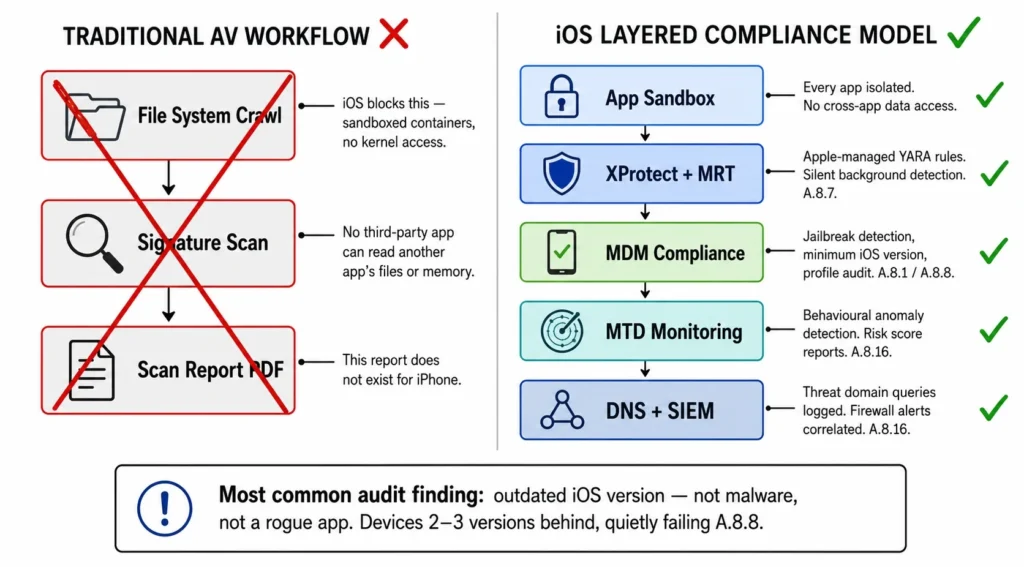
Traditional antivirus works by reading files. iOS doesn’t allow that. Every app runs in it’s own sandboxed container — no app, including any security tool, can read another app’s files or memory. There is no kernel access for third-party software. No file system to crawl.
This isn’t a gap in Apple’s security. It’s the security.
So when an ISO 27001 audit calls for A.8.7 (Protection Against Malware) compliance on iOS devices, the evidence it accepts looks nothing like an AV scan report. It looks like this:
| What ISO Requires | How It’s Implemented on iOS |
| A.8.7 — Malware protection | XProtect (runs silently, Apple-managed), MTD app deployed via MDM |
| A.8.8 — Vulnerability management | MDM-enforced minimum iOS version; device blocked if out of date |
| A.8.9 — Configuration management | Hardening standard: no open Wi-Fi auto-join, Lockdown Mode for high-risk users |
| A.8.1 — Endpoint device control | MDM compliance policy: jailbreak = instant access revocation |
| A.8.16 — Monitoring | MTD alerts feeding into SIEM; weekly device risk score reports |
The single most common finding in our iOS audits? An outdated iOS version. Not malware. Not a rogue app. A device sitting two or three versions behind, quietly failing the A.8.8 vulnerability check — while the client assumed everything was fine because nothing had gone wrong yet.
One client had 14 devices across their executive team. Six were running iOS versions with known CVEs. None of their users had turned off automatic updates intentionally — they’d just dismissed the update notification repeatedly. Under ISO 27001, that’s a documented non-conformity, not a minor oversight.
The Practical ISO Checklist for iPhone Security — What We Actually Run
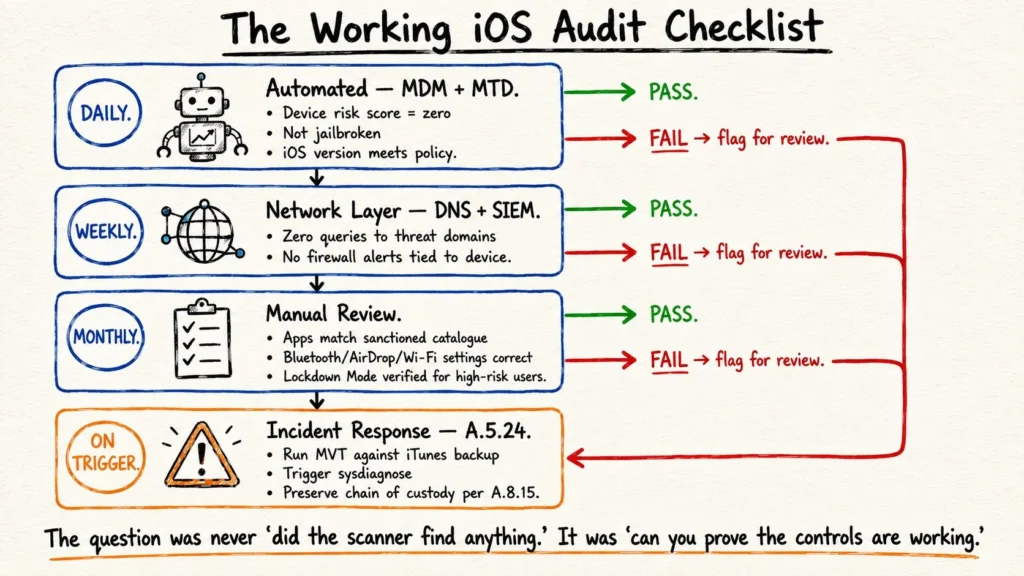
This is the working checklist from our audit process, mapped to the controls that govern each step.
Daily — Automated (MDM + MTD)
- MTD app reports device risk score of zero: no suspicious app behaviour, no malicious network connections detected.
- MDM compliance report confirms: device is not jailbroken, iOS version meets minimum policy, no unauthorized profiles installed.
Weekly — Network Layer (DNS + SIEM)
- DNS filtering dashboard shows zero queries to threat-categorized domains from any managed iPhone.
- SIEM shows no firewall or proxy alerts tied to the device.
Monthly — Manual Review
- Cross-check installed apps against the sanctioned app catalogue (A.8.9).
- Verify Bluetooth, AirDrop and Wi-Fi auto-join settings match the hardening standard.
- Confirm Lockdown Mode status for any users in high-risk roles.
On Trigger — Incident Response (A.5.24)
- If MTD flags an anomaly or device behaviour changes unexpectedly: run Mobile Verification Toolkit (MVT) against an iTunes backup.
- Trigger sysdiagnose (volume up → volume down → hold side button) and retain archive for forensic review.
- Preserve chain of custody per A.8.15 logging requirements.
Apple’s Built-In Protections — What’s Running Before You Touch Anything
Before any MDM or MTD tool enters the picture, Apple runs several security services in the background that satisfy parts of A.8.7 by default. Most clients don’t know these exist.
| Mechanism | What It Does |
| XProtect | Signature-based detection, silently updated by Apple via YARA rules |
| Malware Removal Tool (MRT) | Remediates malware already on the device |
| Gatekeeper | Ensures only Apple-trusted code executes, including enterprise apps |
| System Integrity Protection | Blocks modification of critical system files — even by root |
| Lockdown Mode | Extreme hardening for high-risk users; disables most message attachment types and web technologies |
These aren’t optional installs. They run on every iPhone. The auditor’s job is simply to confirm they haven’t been disabled or undermined — most commonly through jailbreaking, which dismantles all of the above simultaneously.
Verifying them is straightforward: Settings > General > Software Update confirms XProtect rules are current. Settings > Privacy & Security confirms Lockdown Mode status. Any gap here is recorded as a non-conformity against A.8.8.
The Honest Takeaway
Clients come into an iOS audit expecting a scan report — a PDF from some security tool saying “0 threats found.” That report doesn’t exist for iPhones and chasing it wastes time.
What ISO 27001 asks for instead is objective evidence: that layered controls are deployed, that they produce logs and that those logs feed into a documented response process. An iPhone running current iOS, managed by MDM, monitored by MTD, with clean DNS logs and no unauthorized profiles — that’s a passing audit. Not because nothing bad can happen, but because every reasonable technical control is in place and evidenced.
The question was never “did the scanner find anything.” It was always “can you prove the controls are working.”