 Rafael Weiss ( Androind Engineer )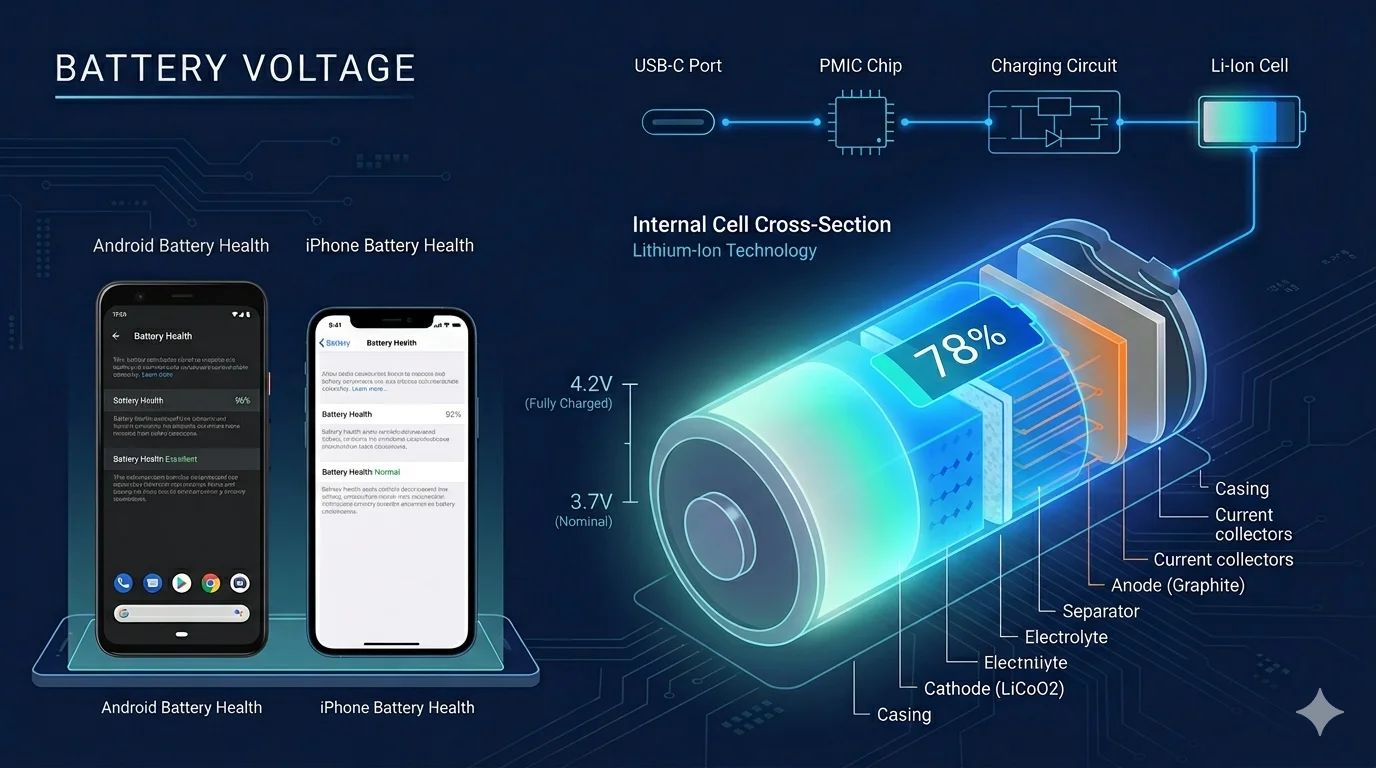
What Even Is Battery Voltage — and Why Does It Matter More Than mAh?
Everyone obsesses over mAh. “Oh, the Galaxy S24 Ultra has 5,000 mAh — it must last forever.” Sure. But mAh without voltage tells you almost nothing about actual energy stored. A 3,000 mAh battery at 5V holds more energy than a 4,000 mAh battery at 3.7V. That’s just math — Wh = (mAh × V) ÷ 1000.
Voltage is the pressure behind the current. Think of it like water through a pipe — mAh tells you how much water is in the tank, voltage tells you how hard it’s being pushed. Both matter. One just gets ignored.
Unlike battery percentage — which gets adjusted, smoothed out and estimated by firmware — voltage is a direct electrical property of the battery. It changes based on physics, not software guesses. That’s why a lot of technicians trust voltage readings more than the percentage bar on screen.
Here’s the thing though — most people checking their phone right now have zero idea what voltage their battery is running at. And that gap between percentage and actual voltage state? That’s where a lot of battery confusion lives.
The Real Voltage Numbers Inside Your Phone’s Battery
Li-Ion Chemistry: The Standard That Never Left
Most smartphone batteries operate between 3.7V and 4.2V, with 3.7V being the nominal (average) rated voltage for typical lithium-ion cells. That 3.7 number shows up stamped on basically every phone battery manufactured in the last decade — Android or iPhone, budget or flagship.
Smartphones almost universally use lithium-ion with NMC (nickel manganese cobalt oxide) chemistry — often labeled simply as “Li-ion” or “Li-polymer.” Starting in 2023, some manufacturers began adopting silicon-carbon variants for higher energy density, though Apple and Samsung haven’t moved there yet.
Voltage at Different Charge States
This is the table worth bookmarking:
| Battery State | Approximate Voltage |
| Fully Charged | ~4.20V |
| 80% Charge | ~4.00V |
| 50% Charge | ~3.85V |
| 20% Charge | ~3.65V |
| Near Empty / Cutoff | ~3.20V |
| Damaged / Dead | Below 3.00V |
A fully discharged lithium battery sits around 3.2V — drop lower than that and the cell is likely permanently damaged. Fully charged hits 4.2V, with 3.7V being the midpoint average during normal discharge.
Why Your Charger Runs at 5V (Not 3.7V)
Phones accept a 5V external supply because that’s a standardized, convenient USB input. The phone’s internal charging circuit converts and controls that input to safely charge a 3.7V nominal lithium-ion cell using a CC/CV (constant current/constant voltage) charging profile.
That internal controller — the PMIC (Power Management Integrated Circuit) — is doing real work here. It takes whatever voltage comes in from the wall and negotiates it down to what the battery actually needs at that moment. The diodes and protection circuits built into that chain are what prevent overcharge, thermal runaway and voltage spikes from destroying the cell. Components like Schottky diodes, available from suppliers like CNChipDepot, play a direct role in this — specifically in their range of diodes and Schottky diodes used in power regulation circuits.
Quick Reference: Voltage vs Chemistry
| Battery Type | Nominal Voltage | Max Charge Voltage |
| Li-Ion (standard) | 3.60V – 3.70V | 4.20V |
| Li-Polymer | 3.70V | 4.20V |
| Li-Ion (high-density) | 3.85V | 4.35V – 4.40V |
| LiFePO4 | 3.20V | 3.65V |
How Android and iOS Actually Manage Voltage — They’re More Different Than You’d Think
Same lithium chemistry. Different everything else.
iOS: Tight Control, Less Transparency
Apple’s approach is integration-first. The A-series chip, the iOS power stack, the PMIC — all designed together. iOS aggressively freezes background apps, preventing them from secretly draining the battery. The chip also switches instantly between high-performance and efficiency cores depending on what the phone is actually doing at that moment.
iOS Battery Health works as a diagnostic and constraint layer — it reports maximum capacity and peak performance capability, then optionally throttles the CPU when degradation exceeds thresholds. “Optimized Battery Charging” learns your daily routine and delays charging past 80% until it’s actually needed, reducing time spent at high voltage.
Here’s the irony though — iOS only offers a handful of vague battery stats, even though Apple’s own support page explains battery degradation behavior in terms of voltage. iPhone users still can’t view raw battery voltage directly. After the Batterygate lawsuit — where Apple paid affected users $92.17 each for silently throttling processors due to degraded batteries without telling anyone — that omission feels deliberate.
Android: Open, Fragmented and Sometimes Better For It
Android’s situation is messier, but not necessarily worse. The variance is real — a Pixel 9 Pro and a $150 budget phone both run Android, but their voltage management systems are miles apart.
Android’s Adaptive Battery uses on-device machine learning to predict app usage patterns and restrict background activity for rarely-used apps — cutting unnecessary wake locks and foreground services that generate heat and drain voltage faster than normal use.
- Samsung devices use their own power management layer on top of Android, with adaptive charging built into One UI
- Google Pixel phones access raw battery voltage through developer options and diagnostic tools
- Qualcomm Snapdragon-based devices benefit from the PMIC stack Qualcomm bakes into the chipset itself
On Android, you can actually see your voltage. The USSD code *#0228# on most Android devices pulls up live voltage, current and temperature data. These USSD/MMI codes unlock diagnostic tools that reveal comprehensive information on voltage metrics and current capacity — useful for diagnosing discharge issues. iOS has no equivalent.
Side-by-Side: iOS vs Android Voltage Management
| Feature | iOS | Android |
| View raw battery voltage | ❌ Not accessible to users | ✅ Via *#0228# or apps |
| Optimized charging past 80% | ✅ Built-in (iOS 13+) | ✅ On Pixel, Samsung (varies) |
| CPU throttle on degraded battery | ✅ Automatic (post-Batterygate) | ⚠️ Manufacturer-dependent |
| Background voltage management | ✅ Aggressive, system-level | ✅ Adaptive Battery (ML-based) |
| Fast charging voltage handling | Up to 20W (limited) | Up to 65W–120W (flagship) |
How to Actually Check Battery Voltage on Android and iOS
Android makes this easy. iOS, not so much — and honestly, that’s a deliberate choice on Apple’s part.
On Android
Three methods, depending on how deep you want to go:
Method 1 — The Dialer Code (Fastest)
Open your phone dialer and type: *#*#4636#*#*
A testing menu pops up automatically — no confirmation needed. Navigate to Battery Information and you’ll see live voltage, temperature and charge status. This code works on most Android devices and displays details like voltage, temperature, maximum capacity and health status — though some manufacturers disable it, so results vary.
Samsung users specifically can also try *#0228# — this reveals comprehensive voltage metrics and current capacity useful for diagnosing discharge issues.
Method 2 — ADB Command (For the Technical Crowd)
If you’ve got USB debugging enabled:
adb shell dumpsys battery
This spits out a raw data dump including voltage in millivolts. So 3850 = 3.85V. On Android, you can also install Ampere to see voltage if the device exposes it through standard APIs — works on most mid-range and flagship devices.
Method 3 — Third-Party Apps
Easiest route for most people. Three worth knowing:
| App | Platform | What It Shows |
| AccuBattery | Android | Voltage, capacity, cycle count, health % |
| Battery Guru | Android | Live voltage, charging speed, wakelock data |
| CPU-Z | Android | Voltage, temperature, SoC info |
| Ampere | Android | Charging/discharging current + voltage |
Battery Guru shows charging speed, battery voltage, estimated capacity and detailed statistics split by screen-on and screen-off cycles — plus wakelock detection for idle apps draining power quietly in the background.
On iOS
Blunt answer: you can’t read raw voltage from iOS natively.
Third-party apps cannot read raw battery voltage on iOS because Apple restricts hardware access at the OS level. The best you get natively is Settings → Battery → Battery Health & Charging, which shows maximum capacity percentage and peak performance status. No volts. No milliamps.
Even Apple’s own support documentation explains battery degradation in terms of voltage — yet iPhone users still can’t view that number themselves. After Batterygate, that gap feels less like an oversight and more like a product decision.
Workaround for iOS — External USB Meter
Want actual voltage data while charging an iPhone? Use a USB-C power meter. Plug it inline between the charger and cable. These small pass-through meters display real-time input voltage, current draw and accumulated charge — works with any device, any OS.
Li-ion NMC cell — voltage vs. state of charge. Values representative of typical smartphone battery chemistry.
Voltage, Fast Charging and the Hardware Keeping It All Safe
Fast charging is really a voltage story. Most people think it’s just “more current = faster charge.” Partially true. But what’s actually happening involves negotiated voltage levels, protection diodes and a constant battle against heat.
How Fast Charging Protocols Work
When you plug in a USB-C charger, the phone and charger talk to each other. Not metaphorically — there’s actual communication happening over the USB Power Delivery (USB-PD) protocol. The charger announces what it can supply (5V, 9V, 12V, 20V) and the phone negotiates what it wants.
Fast-charge protocols like USB Power Delivery and Qualcomm Quick Charge increase charger voltage and/or current to reduce charge time — the phone’s PMIC negotiates the appropriate voltage and still enforces proper cell charging limits internally.
Here’s what that looks like across common standards:
| Fast Charging Standard | Input Voltage | Max Wattage | Common Devices |
| USB-PD (standard) | 5V – 20V | 100W+ | Universal |
| Qualcomm Quick Charge 5 | Up to 20V | 100W | Snapdragon flagships |
| Apple Fast Charge | 9V @ 2A | ~20W | iPhone 8 and later |
| Samsung Super Fast Charge | 11V @ 5A | 45W – 65W | Galaxy S series |
| OnePlus SUPERVOOC | 11V @ 6.1A | 100W+ | OnePlus 12, etc. |
One thing nobody tells you — fast charging regularly at over 40°C can cause measurable long-term cell stress. A short 5–15 minute fast-charge top-up is fine, but using 65W+ for a full charge from 0–100% repeatedly is what causes cumulative damage.
The Hardware That Actually Protects Your Battery
Every time voltage flows in or out of your battery, a stack of protection components sits in the middle — deciding what gets through and what doesn’t.
Key components in the chain:
- PMIC (Power Management IC) — The main controller. Converts incoming voltage, manages charge curves, communicates with the charger
- Schottky Diodes — Fast-switching diodes that prevent reverse current and voltage spikes from reaching the battery. Critical in fast-charging circuits specifically because of how quickly current direction can shift. Suppliers like CNChipDepot carry the full range of these components — their Schottky diode catalog covers the exact forward-voltage specs used in mobile charging design
- NTC Thermistor — Temperature sensor that tells the PMIC to throttle charge rate if the battery gets too hot
- BMS (Battery Management System) — Software-side layer that tracks voltage, temperature and cycle count to adjust charging behavior dynamically
Without these components working together, a 65W fast charge hitting a 3.7V cell directly would be a disaster. The reason it isn’t is exactly because of this protection stack — not magic, just well-engineered hardware.
Keeping Your Battery Voltage Healthy — What Actually Works
A lot of the advice out there on battery health is recycled myth. The 0–100% cycle thing. Turning your phone off at night. Using any charger that fits. None of that is where the real damage happens.
Voltage is the actual lever. Specifically: how much time your battery spends at high voltage.
The 20–80% Rule — There’s Real Science Behind It
A lithium-ion cell charged to 4.20V typically delivers 300–500 cycles. Charged to only 4.10V, life extends to 600–1,000 cycles. Drop to 4.0V and you’re looking at 1,200–2,000 cycles. The optimal charge voltage for longevity according to battery researchers is 3.92V per cell — this eliminates all voltage-related stress.
That 3.92V corresponds to roughly 80% charge. Which is why every battery expert says stop at 80%.
Roughly every 0.1V decrease in cell voltage doubles the cycle life, according to Battery University — so keeping a phone in the 30–80% range keeps voltage lower and meaningfully extends battery lifespan.
Platform-Specific Settings to Enable Right Now
iOS:
- Settings → Battery → Battery Health & Charging → Optimized Battery Charging — On by default in iOS 13+, but worth confirming it’s active. Delays charging past 80% until you actually need it.
Android (varies by manufacturer):
| Brand | Setting Name | Where to Find It |
| Samsung | Protect Battery | Settings → Battery → More battery settings |
| Google Pixel | Adaptive Charging | Settings → Battery → Adaptive preferences |
| OnePlus | Optimised Charging | Settings → Battery → Optimised Charging |
| Xiaomi | Battery Saver Charge | Settings → Battery → Advanced settings |
What Actually Damages Voltage Capacity — The Short List
- Overnight charging past 100% — keeping a battery at high voltage for extended periods, especially above 80%, accelerates degradation even when the reported capacity still looks fine. Stronger voltage slumps show up before capacity percentage drops
- Heat during charging — high temperatures during charging damage the delicate internal materials, increasing internal resistance and reducing capacity over time. Removing thick phone cases while charging helps heat dissipate faster.
- Deep discharges repeatedly — dropping to 0% regularly stresses the cell more than charging to 100%, chemically speaking
- Cheap third-party chargers — off-brand adapters may provide inconsistent voltage, which can negatively impact battery health through irregular current spikes during charging.
Quick Reference: Battery Voltage Health Habits
| Habit | Good or Bad? | Why |
| Charge between 20–80% | ✅ Good | Keeps cell voltage in low-stress range |
| Charge overnight to 100% | ⚠️ Moderate | High voltage duration = faster degradation |
| Fast charge occasionally | ✅ Fine | Heat is the issue, not fast charging itself |
| Fast charge every single day | ⚠️ Moderate | Cumulative heat damage over months |
| Let it die to 0% regularly | ❌ Bad | Deep discharge stresses Li-ion cells |
| Leave phone in hot car | ❌ Bad | Heat accelerates cell degradation fast |
| Use original/certified charger | ✅ Good | Stable, negotiated voltage delivery |
Conclusion — Voltage Is the Honest Number Your Phone Hides From You
Battery percentage is a story your phone tells you. Voltage is what’s actually happening.
The gap between those two things is where most battery confusion lives — unexpected shutdowns at 15%, phones that die faster after a year, the mystery of why two phones with identical mAh specs behave completely differently. Knowing your battery’s minimum and maximum voltage turns mysterious numbers into actionable information — in an era where smartphones deliberately provide less transparency about their internal workings, it returns a small measure of control.
Android gives you that access. iOS doesn’t. Whether that frustrates you probably depends on how much you trust Apple to manage things quietly on your behalf — and post-Batterygate, that trust isn’t universal.
What’s clear regardless of platform: cell phones optimize voltage to improve battery life by reducing performance requirements during low-charge states or light usage — meaning voltage management is already happening inside your device, whether you’re watching it or not. The question is whether you want visibility into it.
The hardware doing that work — PMICs, Schottky diodes, BMS circuits — is unglamorous stuff. Nobody talks about it in phone reviews. But suppliers like CNChipDepot stocking the diodes that end up in these protection circuits are part of what keeps a 65W charge from cooking a 3.7V cell. The engineering chain behind “just plug it in” is longer than it looks.
Keep your phone between 20–80%. Watch the voltage if your platform lets you. Don’t sleep on a fast charger every single night. That’s genuinely most of it.