 Sam Hewitt (Game Developer)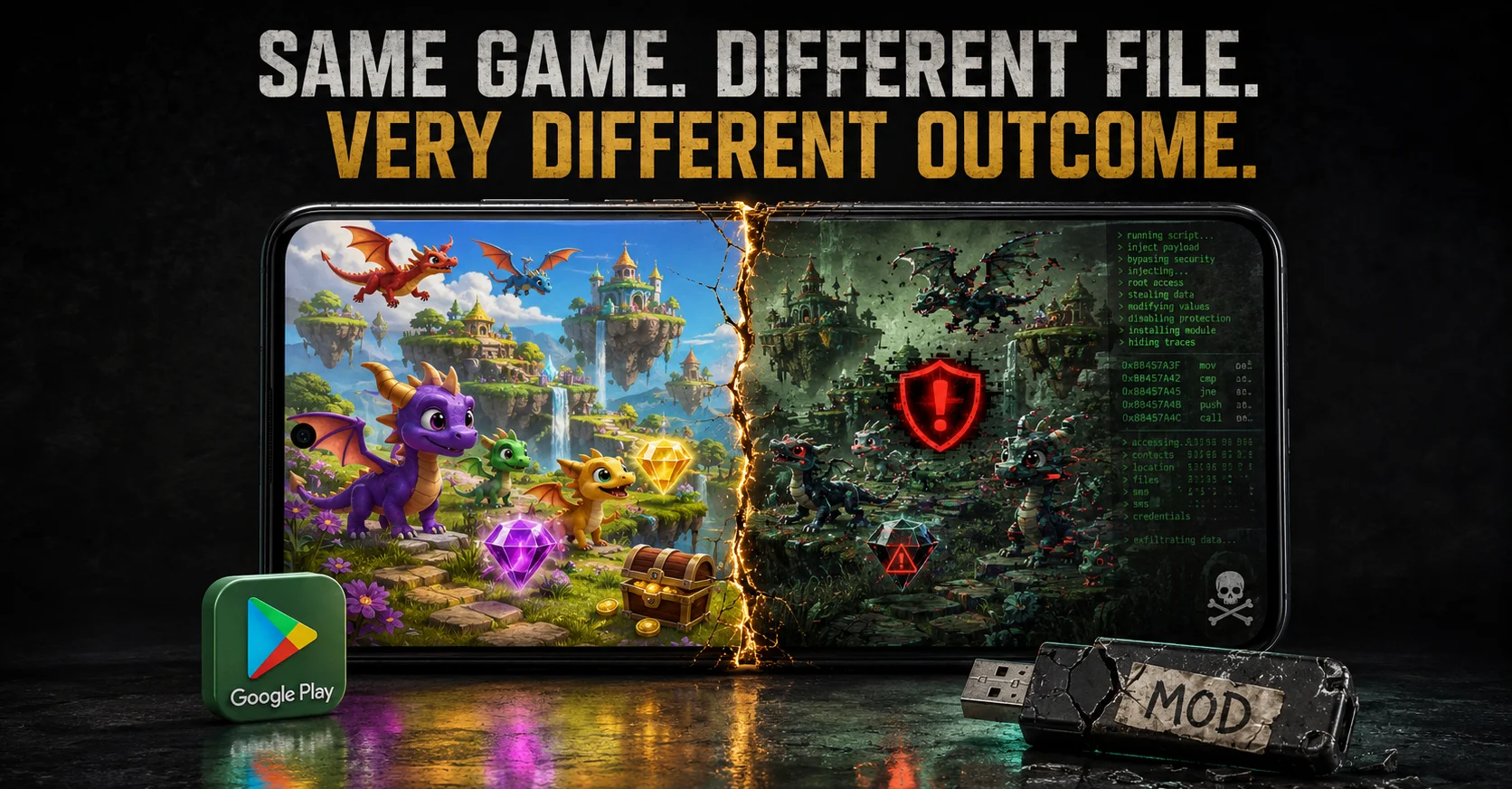
Most of the Mod APKs for Dragon Paradise are a danger to your real account, will ban you permanently and will erase all of your progress. The official game, slow timers and all, is indeed a safer choice.
What Exactly Is a “Mod APK” for Dragon Paradise?
So Dragon Paradise: City Sim is a free-to-play city builder by Sparkling Society — you hatch dragons, expand floating islands, manage resources, the usual idle-game loop. It’s fun, honestly. But it’s also built around wait timers and a premium currency (gems) that nudges you toward spending real money.
That’s where mod APKs come in.
A mod APK is basically the game’s original Android install file — the .apk — that someone has cracked open, edited and repackaged. The modifications vary, but the typical promises look something like this:
- Unlimited gems and gold that never run out.
- All dragons and islands unlocked from the start.
- Free in-app purchases (bypassing Google Play billing entirely).
- No ads.
- Faster building and hatching timers.
Sounds great on paper. And that’s exactly the point — these things are designed to look attractive. The people distributing them know what frustrated free-to-play players want to hear.
What the download page won’t tell you is covered in the next few sections.
How Are These Mod APKs Made and Distributed?
It’s not magic and it’s not particularly sophisticated either. Here’s roughly how it works:
Someone downloads the official APK, then runs it through a decompiler — tools like APKTool or Jadx are popular for this. That breaks the app down into readable code. From there, they patch specific values: resource counters, license checks, billing flows. Then the whole thing gets recompiled and signed with a new certificate — usually a generic debug one, not the original developer’s.
Some modders stop there. Others don’t. That extra step — injecting additional code — is where things get ugly. It might be their own ads, a crypto miner running quietly in the background or something worse: spyware that lifts your Google account tokens or reads your SMS.
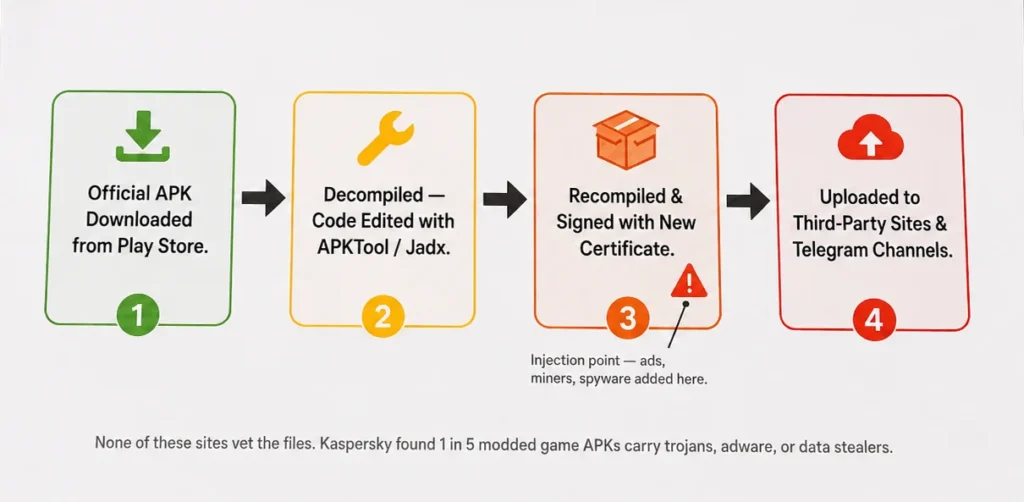
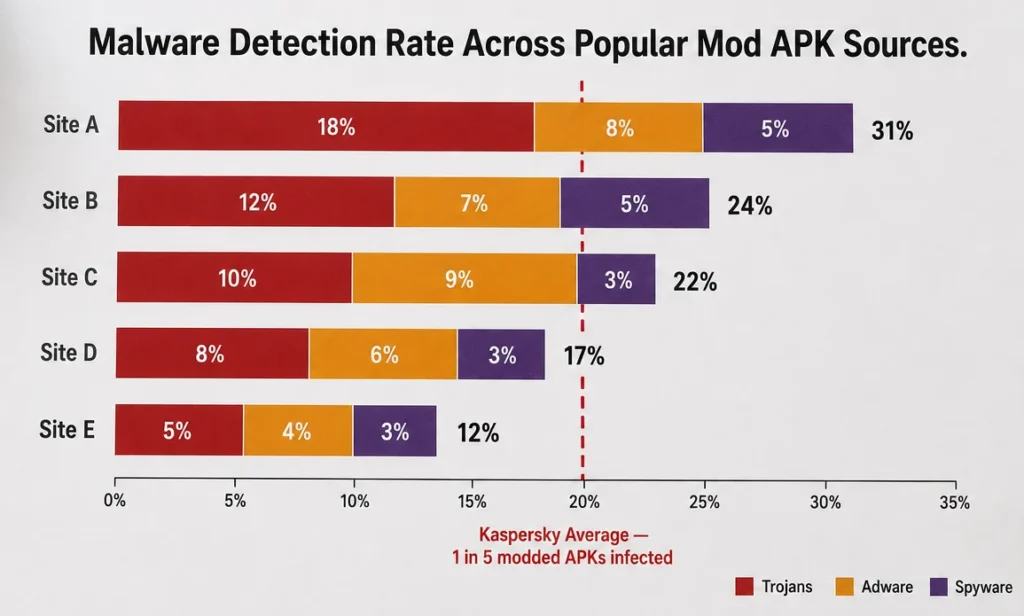
These files end up on sites like HappyMod, blackmod.net, an1.com and dozens of Telegram channels. None of them are vetted. None of them are official. And according to Kaspersky’s research, roughly 1 in 5 modded game APKs on popular third-party sites contains trojans, adware or data stealers. That stat is worth sitting with for a second.
Step-by-Step Installation: The Typical Process (And It’s Pitfalls)
Here’s what the actual install process looks like — and where it starts going wrong.
The steps most sites walk you through:
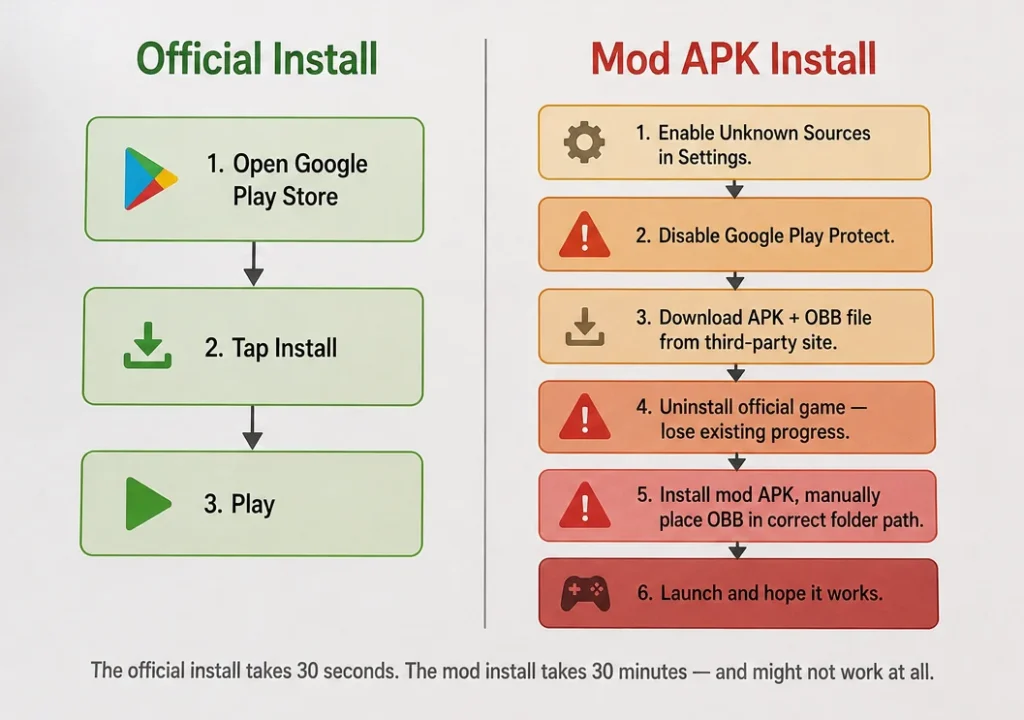
- Step 1 — Enable Unknown Sources. You have to go into Android settings and allow installs from outside the Play Store. On newer Android versions it’s per-app: you grant permission to your browser or file manager specifically.
- Step 2 — Disable Play Protect. This is the one that should make you pause. Google’s built-in malware scanner flags most mod APKs immediately. So the instructions tell you to turn it off. You’re essentially being asked to lower your phone’s defenses before installing an unknown file from a stranger’s website.
- Step 3 — Download the APK (and sometimes an OBB file). The OBB is additional game data — graphics, audio assets. It has to be manually placed in a specific folder (/Android/obb/…). Miss that step and the game crashes on launch every single time.
- Step 4 — Uninstall the official game first. Because the mod uses a completely different signing certificate Android won’t let it install alongside the original. So your existing progress? Gone, unless you’ve done a manual backup.
- Step 5 — Install, launch, hope. Some mods need a floating overlay menu to actually activate the cheats. Others just work. Many don’t work at all.
Where it actually breaks down:
The signature mismatch issue is bigger than most guides admit. Your original save is tied to your Google Play Games account through the official app’s certificate. The mod has a different one. Those two don’t talk to each other — so even if you back up your data and try to restore it later, there’s a real chance it just doesn’t load.
Play Protect is the other thing. Even after you disable it, it re-enables itself periodically. Plenty of people have come back to find their mod quietly removed and their game progress sitting in a folder that no longer has an app to open it.
And the OBB issue — genuinely, more mod installs fail here than anywhere else. The folder path has to be exact. One wrong subfolder name and the game won’t find it’s assets.
The Hidden Risks: Malware, Bans & Data Loss
This is the part mod sites obviously don’t put in their tutorials.
Let’s start with malware — because it’s not a theoretical risk, it’s a documented one. Kaspersky’s research on mobile threats found that around 20% of modded game APKs on popular third-party sites carried trojans, adware or information stealers. One in five. And Dragon Paradise specifically isn’t some high-profile title that attracts careful, reputable modders — it’s a casual city builder, which means the people repackaging it are almost certainly doing it fast and dirty.
What can actually end up on your phone:
- Trojans that run silently, harvesting saved passwords or banking credentials.
- Adware that serves ads through system-level permissions you can’t easily revoke.
- Crypto miners quietly burning through your battery and data in the background.
- Info stealers — the nastiest kind — that specifically target Google account tokens and SMS messages, which can be used to bypass two-factor authentication.
And here’s the thing about a casual game mod specifically — nobody expects a dragon city builder to steal their bank login. That’s exactly why it’s an effective vehicle.
Official App vs. Mod APK — Risk Comparison
| Factor | Official App | Mod APK |
| Malware risk | None | ~20% of sources infected |
| Account ban risk | None | High — server-side detection |
| Data loss risk | Low (Play Games backup) | High — no cloud sync |
| Progress after update | Automatic | Manual, often lost |
| Play Protect compatible | Yes | No — must be disabled |
| Legal standing | Fully compliant | Violates ToS and copyright |
The ban situation is more straightforward than people expect.
Sparkling Society runs server-side validation for events and purchases — meaning the game’s servers are checking whether your resource counts and purchase history actually make sense. Unlimited gems on a free account with no purchase history? That gets flagged. It’s not always immediate, sometimes it takes days or a few play sessions, but according to community reports on r/AndroidGaming, permanent bans and leaderboard removals from modded clients are common enough that people warn about it regularly.
And then there’s data loss — which honestly hits harder than the ban for most people.
Because the mod uses a different certificate, it can’t sync with Google Play Games properly. Your progress lives locally on your device. No cloud backup. So when the mod breaks after a game update — which it will, because official updates don’t apply to modified APKs — you’re starting from scratch. Every dragon you hatched, every island you unlocked. Gone. You then have to hunt down a new modded version, hope someone has updated it and reinstall all over again.
It’s a lot of work to avoid spending three dollars on a gem pack.
Android vs. iOS: Why Mods Work Differently
Quick note here — this article is focused on Android, but it’s worth understanding why the iOS side exists and why it’s actually messier, not easier.
On Android, sideloading is built into the OS. Google allows it, even if Play Protect fights back against it. That’s why mod APKs are so widespread — the technical barrier is genuinely low. Enable one setting, download a file, install. Done.
iOS doesn’t operate that way. Apple have a walled garden, meaning that all apps must be signed with a trusted certificate before running. That modded IPA files are the iOS version of a mod APK means that they need a third-party enterprise certificate, a sideloading tool like AltStore (which requires a computer) or a complete jailbreak in order to be installed.
The enterprise certificate route is probably the most common and it’s also the most unstable. Apple revokes those certificates regularly — sometimes within days. When that happens, the app stops launching instantly. Progress gone. You’re back to square one, hunting for a new certificate source.
Jailbreaking introduces a whole separate layer of risk that goes well beyond a single game. And even then, Sparkling Society’s server-side checks don’t care whether you’re on Android or iOS — abnormal resource counts get flagged either way.
The practical takeaway: Android mods are easier to install but carry higher malware exposure. iOS mods are harder to set up, break more frequently and require more technical effort for the same outcome. Neither platform offers a safe or stable modding experience for a live-service game like this one.
For a deeper look at how Android’s security model handles app permissions and sideloading, Google’s own documentation is worth a read — especially if you’re curious about what “unknown sources” actually unlocks on your device.
Safe and Legitimate Alternatives to Cheating
So if mods aren’t worth it — and they really aren’t — what actually works?
A few things that genuinely help without touching anything shady:
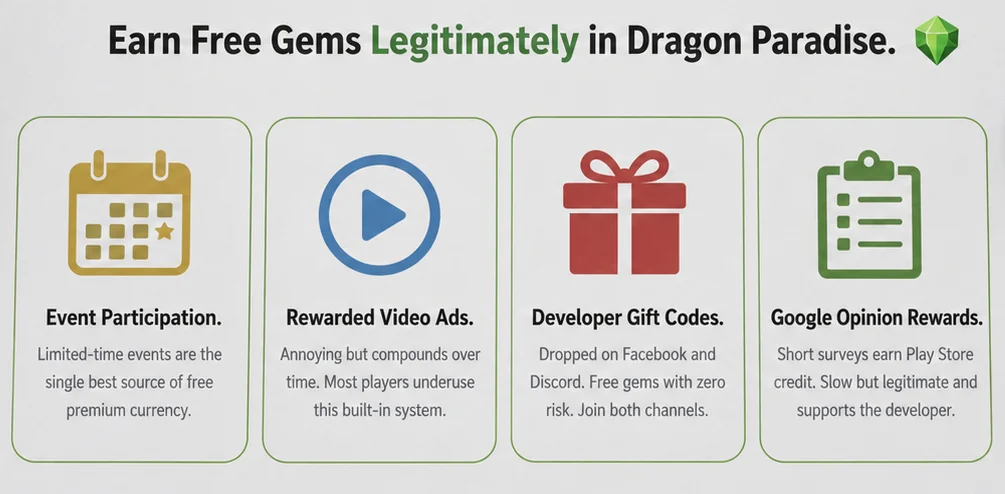
- Events are the real gem source. Sparkling Society runs limited-time events fairly regularly and they’re generous with premium currency if you participate actively. Logging in during events consistently will get you further than most people expect.
- Rewarded ads add up. The game offers optional video ads for gems, speed-ups and resources. Annoying? Sure. But watching a few each session compounds over time — it’s basically the game’s built-in “free premium currency” system that most players underuse.
- Gift codes from official channels. The developer occasionally drops codes through their Facebook community page and Discord. Worth joining both and keeping an eye out — these are free gems with zero risk attached.
- Google Opinion Rewards is genuinely underrated for this. Short surveys, small amounts of Play Store credit, redeemable for gem packs. It takes a while to accumulate meaningful credit but it’s legitimate, it supports the developer and your account stays clean.
- Patience, honestly. Dragon Paradise is designed as a slow burn. The timers feel brutal at first but the game is built to be played in short sessions across days, not marathoned in one sitting. Playing it that way — checking in, collecting, logging off — makes the progression feel a lot less grindy.
- If you want a similar experience without the IAP pressure, games like Merge Dragons! or open-source city builders on F-Droid offer dragon-themed progression without the same monetization aggression.
Conclusion & Final Verdict
Here’s the honest summary: mod APKs for Dragon Paradise: City Sim aren’t really a shortcut. They’re a trade — and it’s a bad one.
You’re trading a slow gem grind for a real chance of malware on your personal device. You’re trading wait timers for permanent account bans and progress that vanishes the moment the official game updates. You’re disabling your phone’s security scanner, installing a file from a site nobody vets and handing unknown code permission to run on a device that probably has your banking apps, your photos and your Google account sitting on it.
For a city builder. About dragons.
The risk-reward math just doesn’t work. And the frustrating part is that the people most likely to install these mods are casual players who just want to enjoy the game without feeling nickeled-and-dimed — which is completely understandable. The monetization in games like this is genuinely aggressive. That frustration is valid.
But the mod APK ecosystem doesn’t exist to help those players. It exists because repacked apps with injected code are an effective malware delivery vehicle and frustrated free-to-play gamers are a reliable audience.
The bottom line:
If Dragon Paradise is fun to you, play it officially. Use events, watch the optional ads, grab gift codes when the developer drops them. It’s slower, sure — but your account stays intact, your progress is backed up and your phone isn’t quietly mining crypto at 2am.
If the monetization genuinely makes the game unfun, that’s also a completely valid conclusion. Uninstall it and find something that respects your time better. There are good free games that don’t gate everything behind timers and gem walls.
What’s not worth it — not even close — is handing a random modder access to your Android device to skip a hatching timer.