apk
apk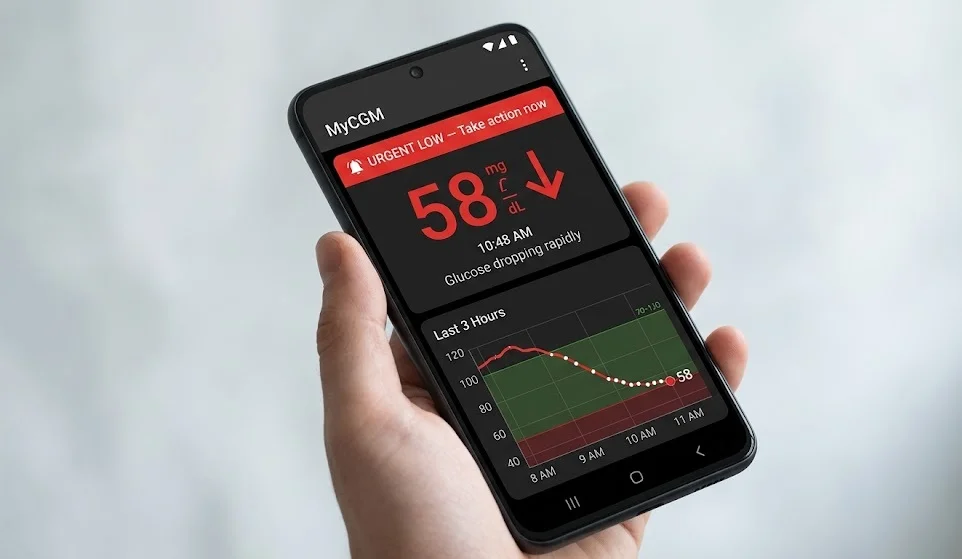
If you use the Dexcom G6 continuous glucose monitoring system on an Android phone, you may have heard about a software recall that made headlines in late 2025. Here’s the short version: a bug in one specific app version — v1.15.0 — could cause the app to crash without warning, cutting off glucose readings and, more critically, silencing the alerts that warn you about dangerous highs and lows. The FDA classified it as a Class I recall, their most serious category. That sounds alarming. The reality, thankfully, was more contained — Dexcom caught it fast, only a small number of users were ever exposed and the fix was straightforward. But it’s still worth understanding exactly what happened, why it mattered and what it means for G6 users going forward.
What Actually Went Wrong
The Dexcom G6 Android app, version 1.15.0 — catalog number SW11678 for the US market — had a software defect that caused the app to terminate unexpectedly. No warning, no error message. It just stopped.
For most apps, that’s annoying. For a CGM app, it’s a different kind of problem entirely.
The G6 system works by having a small sensor under your skin continuously measuring glucose levels and sending that data to either a receiver or a compatible smartphone. When you’re using the phone app as your primary display and that app crashes silently, you lose your readings. More importantly — you lose your alerts.
Those alerts exist for a reason. A “Urgent Low” alarm at 2am has woken up more than a few T1D patients (and their families) before a dangerous situation got worse. Lose that and you might sleep through hypoglycemia. Or miss a rising glucose that’s heading toward DKA.
The FDA’s concern was direct: missed detection of hyperglycemia or hypoglycemia could lead to severe outcomes — diabetic ketoacidosis, hyperosmolar hyperglycemic state, or worse. That’s why this landed as Class I, not a lower-tier advisory.
Worth being clear on what this was not, though. The bug didn’t cause inaccurate glucose readings. It didn’t affect the G6 hardware, the transmitter, or the receiver. And it had nothing to do with the iOS app, the G7 system, or any non-US version. This was a narrow, specific defect in one Android app version, in the US only.

Who Was Actually Affected — And How Many
This is where the story gets less scary.
Dexcom identified the bug during the rollout of v1.15.0. They halted it before it reached even 1% of their user base. By the time the recall process was formally underway, only around 300+ users had received the problematic version.
Three hundred, in a user base that numbers in the hundreds of thousands.
That doesn’t make it less serious from a regulatory standpoint — one person having a dangerous glucose event they couldn’t be alerted to is enough to warrant action. But it does explain why there are no widespread reports of patient harm tied specifically to this app version. The quick halt and small exposure window likely prevented that.
Quick Scope Summary
| Factor | Detail |
| Affected app version | v1.15.0 only |
| Platform affected | Android (US only) |
| Estimated users exposed | ~300+ |
| Rollout completion | Less than 1% |
| Hardware affected | None |
| iOS affected | No |
| G7 affected | No |
| G6 receiver affected | No |
The Timeline: From Bug to Resolution
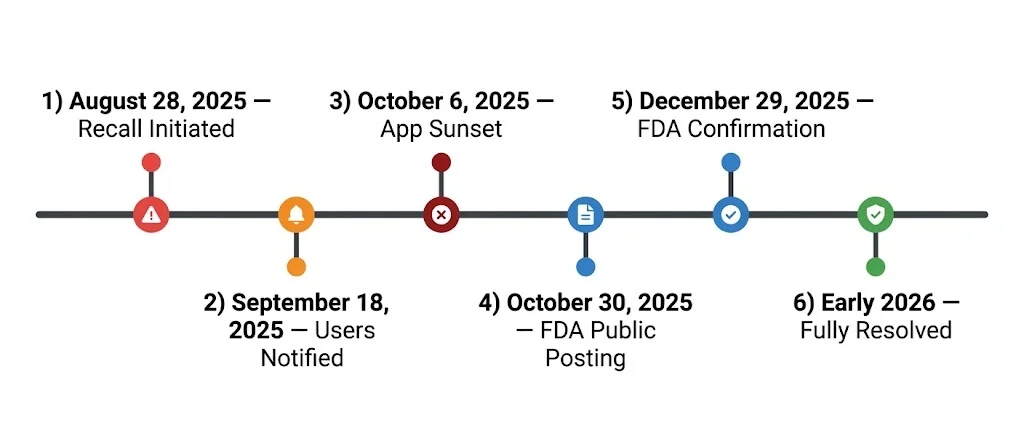
Here’s how events actually unfolded:
- Late August 2025 — Dexcom identifies the defect. Recall initiated around August 28, 2025. Rollout of v1.15.0 halted immediately.
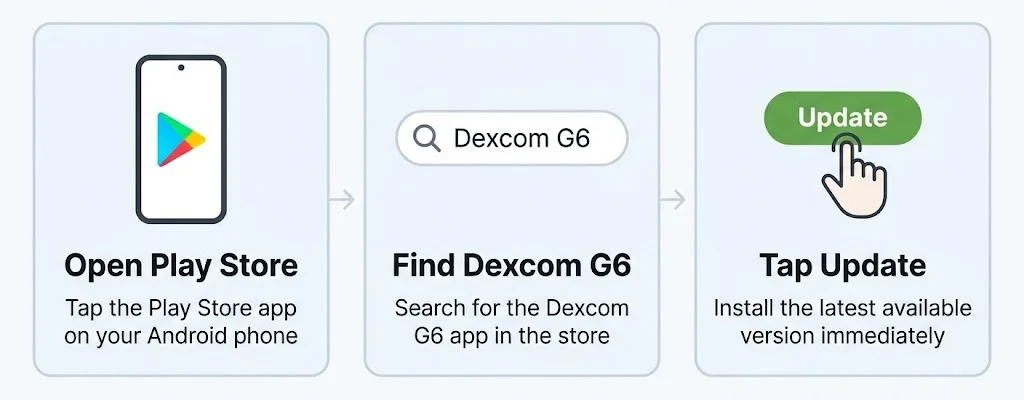
- September 18, 2025 — Dexcom notifies affected users directly via in-app messages and email. The subject line: “URGENT: MEDICAL DEVICE CORRECTION NOTIFICATION.” Users instructed to update immediately via the Google Play Store.
- October 6, 2025 — Dexcom “sunsets” v1.15.0. Meaning: the version was retired, blocked from use. Anyone still running it after this date couldn’t continue.
- October 30, 2025 — FDA publicly posts the recall under recall number Z-0318-2026.
- December 29, 2025 — FDA issues a further update confirming the correction is complete.
- Early 2026 — Issue considered fully resolved. All affected devices updated or blocked.
From bug discovery to full resolution: roughly five months on paper, but practically speaking, the exposure window was closed within weeks of identification.
The Risks — Explained Plainly
Class I recall. Those words together tend to make people nervous and honestly, that reaction isn’t wrong. It’s the FDA’s highest-severity classification. But understanding why it lands there helps put it in perspective.
The FDA doesn’t classify recalls based purely on how many people were harmed. They classify based on what could happen if the problem went unaddressed. In this case — an app that silently crashes, on a device that diabetic patients rely on for life-critical alerts — the potential consequences were severe enough to warrant the top tier.
Think about what a CGM alert actually does in practice. Someone with Type 1 diabetes, particularly overnight, may have no other way of knowing their glucose is crashing. No symptoms sharp enough to wake them. No one checking. Just an app that’s supposed to sound an alarm — and in this case, might not.
That’s the scenario the FDA was protecting against. Not “this definitely happened to hundreds of people.” More like “this could happen to even one person and that’s not acceptable.”
The specific conditions Dexcom and the FDA flagged as potential outcomes:
- Severe hypoglycemia — dangerously low blood sugar, which can cause seizures, loss of consciousness, or worse if untreated
- Diabetic ketoacidosis (DKA) — a life-threatening condition from prolonged high glucose, more commonly associated with Type 1 diabetes
- Hyperosmolar Hyperglycemic State (HHS) — a serious complication seen more often in Type 2 patients, involving extremely high blood sugar and dehydration
- Other severe health events — the FDA’s catch-all for outcomes they don’t want to have to list specifically
Again — no public reports of any of these outcomes occurring due specifically to v1.15.0. But that’s the potential risk profile that justified Class I and it’s a fair call.
What Dexcom Did About It
Fast, mostly. A few things happened in quick succession once the bug was confirmed.
First, they stopped the rollout cold. Less than 1% deployment and they pulled the plug — which is exactly what you’d want a medical device company to do when something like this surfaces mid-release. The instinct to keep pushing an update and hope it stabilizes itself would have been the wrong call here.
Then came the mandatory update requirement. Affected users received that urgent notification on September 18th — both in-app and via email — with clear instructions to update through the Google Play Store. No ambiguity about whether it was optional.
And then the sunset. October 6th, v1.15.0 stopped working. Dexcom didn’t just ask users to update; they made it impossible to keep running the defective version past that date. That’s a meaningful step. A lot of software issues linger because users ignore update prompts. This one didn’t give that option.
For anyone who needed direct support, Dexcom made their technical support line available: 1-844-478-1600.
This Wasn’t the Only Dexcom Issue in 2025
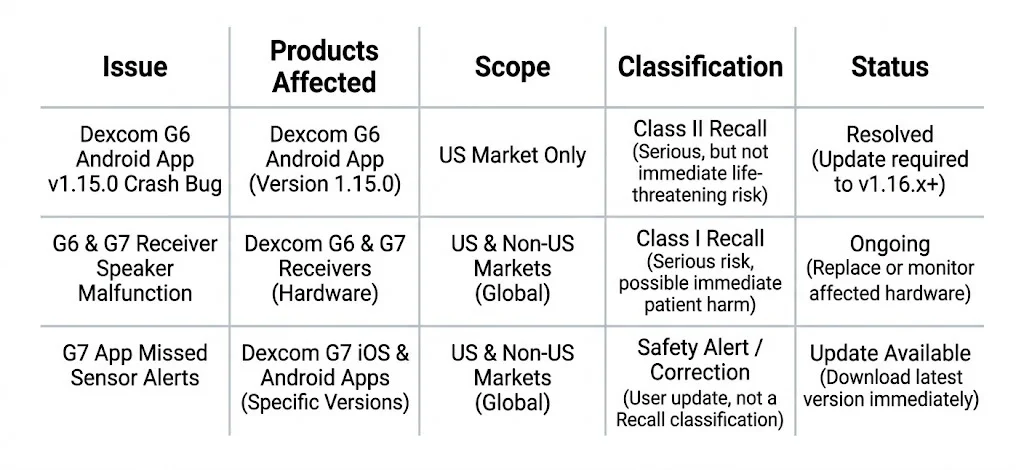
Here’s something the recall coverage didn’t always make clear — the Android app bug was actually one of several safety actions Dexcom dealt with across 2025. They happened to overlap in a way that created some confusion among users trying to figure out which recall applied to them.
The other significant issues that year:
G6 and G7 Receiver Speaker Malfunctions
A separate Class I recall affecting G6, G7 and ONE receivers — the standalone hardware devices, not the app. A speaker defect meant audio alerts could fail to sound. This one affected hundreds of thousands of units, a far larger scope than the Android app issue. If you got a recall notice and assumed it was about your phone app, it may actually have been about your receiver.
G7 App Corrections
The G7 Android, iOS and watchOS apps had their own separate correction for a different problem — missed “Sensor Failed” alerts. Again, distinct from the G6 Android crash bug.
So if you’re a Dexcom user who received multiple notifications in late 2025 and felt confused about what was what — that confusion was valid. Three different issues, different products, overlapping timeframes.
G6 Is Being Discontinued — Here’s What That Means
While all of this was happening, Dexcom also made a separate announcement that directly affects every G6 user regardless of which phone they use or whether they were ever exposed to v1.15.0.
The G6 system is being fully discontinued on July 1, 2026.
That’s not a rumor or a Reddit thread speculation — it’s confirmed. Dexcom is ending support for G6 entirely and pushing users toward the G7, which launched its 15-day sensor version in late 2025.
What does discontinuation actually mean practically? After July 1, 2026:
- Dexcom will no longer manufacture or supply G6 sensors and transmitters.
- Technical support for G6 devices will wind down.
- App updates for the G6 system will stop.
- Insurance coverage for G6 supplies may become complicated depending on your provider.
The G7 is a meaningful upgrade in several ways — smaller profile, no separate transmitter (it’s integrated into the sensor), faster warmup time and that extended 15-day wear. But it’s a transition that requires a conversation with your healthcare provider, a new prescription in most cases and some adjustment time.
If you’re currently on G6, this isn’t something to put off thinking about until June 2026. Supply chains, insurance pre-authorization timelines and provider appointment availability all take time. Starting that conversation now makes the transition less rushed.
What To Do Right Now
Practical stuff. No filler.
1. Check your app version first
Open the Dexcom G6 app on your Android phone. Go to Settings, then About. If you see version 1.15.0 — update immediately through the Google Play Store. If you’re already on a later version, you were never affected or you’ve already been updated. Either way, staying current on app updates going forward is the habit worth keeping.
2. Check if your notification was about the app or the receiver
If you got a recall notice in late 2025 and aren’t sure which issue it referred to — check the subject line and the product description in the email. The Android app recall specifically mentions “G6 and G6 Pro Android US CGM App” and version 1.15.0. The receiver speaker recall will reference hardware, not software. They’re separate issues with separate fixes.
3. Verify your Android compatibility
This is separate from the recall entirely but worth doing while you’re in there. Dexcom has specific Android OS compatibility requirements and newer Android versions — particularly Android 14 and above — sometimes create issues with background app behavior. Check dexcom.com/compatibility to confirm your phone and OS version are supported.
One specific thing to check: battery optimization settings. Some Android phones aggressively put background apps to sleep to save battery. If your phone does this to the Dexcom app, alerts can be delayed or missed — completely unrelated to the recall, but a real issue. Go into your phone’s battery settings and set Dexcom to “Unrestricted” or “Unrestricted background activity,” whatever your phone calls it.
4. Consider a backup receiver
If you rely entirely on your phone for G6 readings and alerts, a Dexcom receiver as a backup isn’t a bad idea — especially during any app transitions, OS updates, or if you’re in the middle of switching to G7. It’s one extra device but it’s also one extra layer of protection during a changeover period.
5. Start planning your G7 transition
Talk to your endocrinologist or diabetes care provider about switching. Don’t leave this for spring 2026. The earlier conversation points to think through:
- Does your current insurance cover G7? What’s the pre-authorization process?
- Will your current phone work with the G7 app? (Check compatibility again — it’s a different app from G6).
- Do you use any third-party integrations like Sugarmate, Loop, or Nightscout? G7 compatibility varies for these
6. Report anything that felt off
If you were running v1.15.0 and experienced a period where your app wasn’t delivering readings or alerts — and especially if that gap contributed to a health event — report it. FDA’s MedWatch program exists for exactly this. You can file at fda.gov/safety/medwatch. You can also contact Dexcom support directly at 1-844-478-1600.
What Users Were Actually Saying
Reddit threads on r/dexcom and r/diabetes_t1 in late 2025 mostly reflected two things: relief that the affected group was small and frustration at the volume of Dexcom notifications hitting inboxes around the same time.
A recurring theme — people conflating the Android app recall with the receiver speaker recall. Understandable given the timing. Several threads had users checking their receiver when the issue was actually the app, or vice versa. The advice that kept appearing: read the notification carefully, identify the specific product mentioned and don’t assume one fix covers everything.
Some threads also surfaced a separate, unrelated complaint — Android 14 and Android 16 compatibility warnings and battery optimization behavior causing alert delays. Those issues aren’t part of the recall. But they’re worth knowing about because the symptoms (missed alerts, app not updating readings) can look similar to what the 1.15.0 bug caused.