 Rafael Weiss ( Androind Engineer )
Lucky Patcher pulls me into the same argument every time go looking into whether it’s safe.
Half the internet says the virus warnings are false alarms, the app rewrites other apps, so of course a scanner panics, that’s not the same as malware. The other half points at the detections and says there’s your answer.
I spent a while trying to work out who was right. Turns out neither, or both, depending on which copy of the file you downloaded. And while everyone’s busy having that fight, the thing actually killing this app is sitting in two Google documents that never mention it.
The Virus Warnings Argument Has No Winner
Microsoft keeps a public threat database. Went looking in it, expecting one entry.
There are three:
- PUA: AndroidOS/LuckyPatcher.A!MTB, a potentially unwanted app.
- UwS: AndroidOS/LuckyPatcher.C, unwanted software.
- Trojan: AndroidOS/Luckypatcher.A, a trojan.
That third one isn’t a soft label. Microsoft uses it for stuff that can do whatever an attacker wants on your phone.
Sandbox scans are all over the place too. One upload got flagged by two engines out of fifty-six. Another got flagged by nobody, zero out of thirty-eight. A third file in there is a repack from a cracking group, with the group’s name sitting right in the filename.
So which one is on your phone? I don’t know, and neither do you. That’s the actual problem.
The app isn’t on the Play Store, so people find it through search. The mirror sites change domains constantly. Same icon, same version number, different file. A clean build and a poisoned repack look identical from the download button, and I’ve never seen a way for a normal person to tell them apart before installing.
Anyone telling you it’s definitely safe is guessing. So is anyone telling you it’s definitely malware. Neither of them knows which file you’ve got.
What Lucky Patcher Does To Your Other Apps
It takes apart an installed app, rewrites the code inside, pulls out the ad calls, and puts it back together.
Android won’t install an app if the signature doesn’t check out. So it carries a signing tool inside it, ZipSigner, and re-signs everything it modifies. Without that, nothing it makes would install. Its root commands run through Runtime.exec calls in a set of classes named after the developer, who goes by ChelpuS. That pseudonym matters later.
The feature list hasn’t moved much since our old Lucky Patcher guide went up years ago. Ad removal, license verification removal, building modified APKs, editing permissions, backups, removing system apps, and a community patch database. Same menu, different world around it.
The interface is nicer than it should be. It scans what you’ve installed and shows you which apps have Google ad code and which ones have a patch available. It feels like a cleanup utility. Think for while that’s a real part of the danger, honestly. It doesn’t look like what it is.
If you don’t have root, the process is rough. Build a modified copy, uninstall the original, install the copy. Uninstalling wipes the app’s data. Then the copy might refuse to open anyway because the signature doesn’t match what it expects. You lose your save file and get nothing. Where those rebuilt files even land got more complicated after Scoped Storage arrived in Android 11 and changed how apps are allowed to write to shared storage.
The Purchase Trick Doesn’t Touch Your Internet Traffic
People say it runs a VPN and reads your encrypted traffic, so a bad copy could steal your banking logins. That’s not how it works.
RevenueCat builds payment systems for Android developers, and they name the tool directly in their documentation. Their explanation: the key that checks purchase signatures is stored inside the app itself. Anyone can pull it out. A modified app can then create fake purchase records that look valid to a check running on the phone.
The developer’s own tutorial pages use the same words. Proxy. Emulation. Nothing about decrypting anything. And reading real HTTPS traffic would need a certificate installed on your device, which is a different thing entirely.
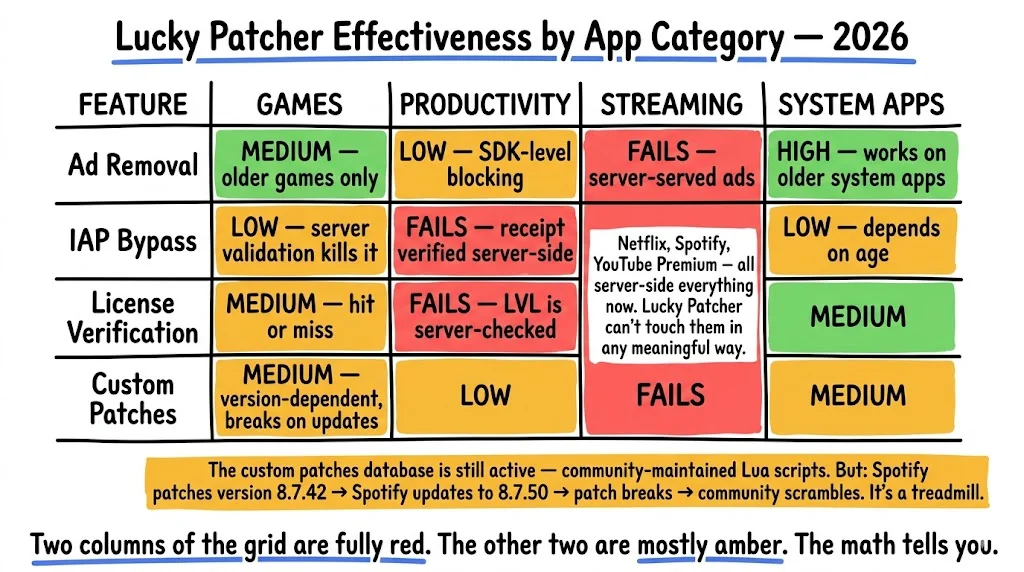
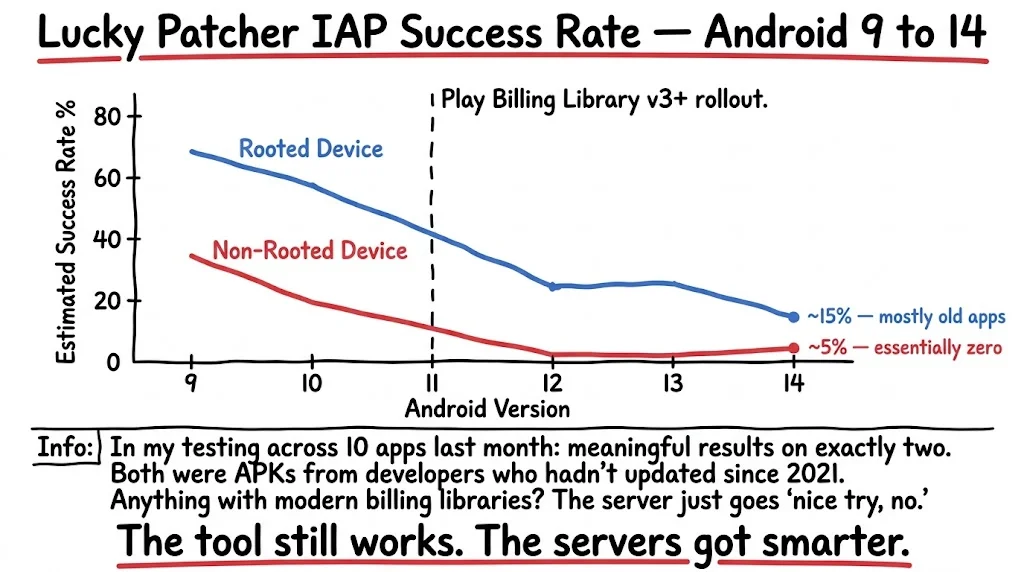
Why it fails now is simple enough. The check moved off the phone. Under the Play Billing Library, a developer sends the purchase token to Google’s servers and asks whether it’s real. Google answers. There’s nothing left on your device to fool, which is why free in-app purchases are the first thing to stop working in almost every modern game people try this on.
Root Is What Breaks Your Banking Apps
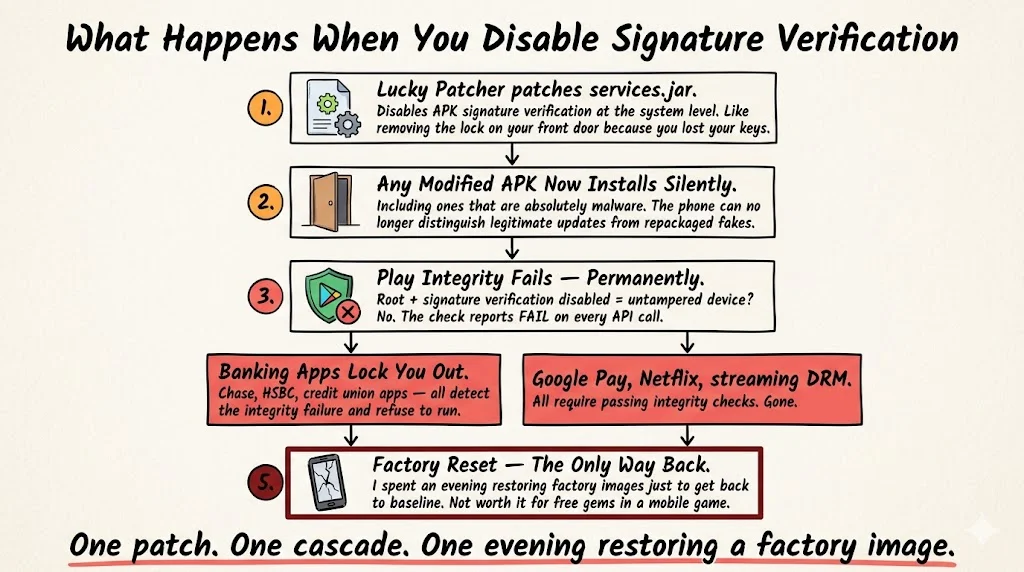
Most of the useful features need root. Even the app’s own FAQ admits it.
The old “Patch to Android” feature went further and turned off signature checking across the whole system. I’d treat that as history now, it belongs to Android 4 and 5 and doesn’t survive modern verified boot. But it did what it sounds like. With signature checking off, anything installs quietly, including things you didn’t look at.
Quick correction while I’m here, because guides keep getting this wrong: SafetyNet is gone. It stopped working on January 31, 2025. If an article mentions SafetyNet or Play Integrity like they’re both options, it’s describing something that hasn’t existed in over a year.
The Play Integrity API took over and got stricter in May 2025. Now it wants hardware-backed proof the phone booted clean. Apps calling it have to have been installed by Google Play. The highest trust level needs a security update from the last twelve months.
Google’s docs are direct about rooted phones. A blank verdict means the app is running somewhere with signs of tampering or a compromised system, and they name rooting specifically. That’s Google’s own wording, not someone’s theory.
So when your bank app locks you out, that’s not the bank being paranoid. It’s working exactly as documented. The hiding modules people run through Magisk to get around it need rewriting every few months, because Google keeps moving.
Google Is Deleting The Check This App Was Built To Remove
This is the part didn’t expect to find, and it’s the real story.
“Remove License Verification” has been the headline feature for over ten years. It targets one specific piece of Google’s system, the Licensing Verification Library. Everyone calls it LVL. It’s old.
Google’s Play Integrity migration guide says the new API replaces the license checks that apps used to make against the Play Store, including the ones LVL handled.
Sit with that for a second. The most-used feature here removes a check that Google is retiring. The replacement runs on a server. You can patch a check that lives on the phone. You can’t patch one that isn’t there.
The custom patches have the same weakness in a more obvious form. They’re written for exact app versions. The app updates, the patch dies, someone writes another one, the app updates again. If you’re spending your weekends in that loop to avoid a subscription, you’ve picked the expensive option. Most suspect people doing it already know that.
The Sideloading Rules Change On September 30
Google is requiring developers to verify their identity before their apps can be installed on certified Android phones. That covers sideloading and third-party stores, not only the Play Store.
After people complained, Google published a workaround in March. To install from an unverified developer you now turn on developer mode, confirm nobody’s talking you into it, restart your phone and sign back in, wait a full day, then confirm with your fingerprint or PIN. After that it stays unlocked for a week or permanently, and you still get a warning on every install.
Enforcement starts September 30, 2026. At first it’s seven app stores and four countries, Brazil, Indonesia, Singapore and Thailand, with wider rollout planned for 2027. ADB still works. Hobby developers get a free account with no ID check, capped at twenty devices.
Now think about an app distributed by someone with no published name, to millions of people. Twenty devices doesn’t cover it. Verification asks for the exact thing a pseudonym exists to avoid.
About The Legal Part For Lucky Patcher Android 2026
Section 1201 and the DMCA’s anti-circumvention provisions ban getting around access controls, and ban sharing tools built to do it. You don’t have to actually pirate anything for it to apply.
It’s messier than forums make out, though. Copying controls aren’t covered the same way, and there are carve-outs for reverse engineering and security research.
One thing almost nobody mentions: this is American law. If you’re reading from outside the US, it isn’t your law.
Is Lucky Patcher Right For Your Android Phone Or Not
Short answer, no. Not on the phone you carry around. Let me be precise about why, because the usual warnings are vague and the real reason isn’t.
The app doesn’t corrupt Android. Nothing about installing it rots your system files or slows your phone down on its own. What it does is ask you to weaken the thing Android uses to decide whether software can be trusted. Root gives it the access it needs. Signature checking, when it’s off, stops your phone from asking whether an app is really from who it claims. Both of those are load-bearing, and once they’re gone, they’re gone for everything on the device, not only the app you wanted to patch.
The consequences are not undone by uninstalling it either. Once your phone fails Play Integrity, it keeps failing. Getting those verdicts back means going back to stock firmware with the bootloader locked, and for most people that’s a wipe. I think a lot of people install this without knowing that the exit costs more than the entry.
Here’s roughly how I’d sort it:
- Your main phone, with banking, payments and work accounts on it. No. The trade is real security for things that mostly don’t work anymore.
- An old spare with nothing signed in on it. Sure, it’s a hobby. Just know you’re playing with something historical, not useful.
- No root at all. Skip it. You lose your app data on every attempt and the emulation almost never survives a modern purchase check.
- Auditing your own app. Use the documented tools instead. They’re better at it and they don’t ask you to compromise the device.
And the part I keep coming back to: even if every one of those boxes worked in your favor, you still can’t confirm what you downloaded. The file source problem doesn’t have a fix. That alone would keep it off my daily phone.
What I’d Actually Do
If you want fewer ads, run Blokada or set up a Pi-hole on your network. Neither one touches your system files. If you want apps without ad code in the first place, F-Droid is right there. If you’re testing your own app’s defenses, apktool and JADX are the normal tools for that job, and none of this requires downloading anything from a site that changes its name every few months.
For current opinions rather than my reading of Google’s paperwork, r/Android and r/AndroidApps are where people who actually run this stuff on daily drivers argue about it, and the threads there turn over faster than any article does. There was a period when Android was wide open and developers trusted the phone way too much, and this app is a real piece of that era.
What gets me is how it’s ending. Nobody sued anyone. There was no raid, no takedown, nothing to point at. A migration guide quietly retires the check it was famous for removing, a verification policy has no box for a developer without a name, and neither document has ever heard of Lucky Patcher. Between them they’ve done more than ten years of virus warnings ever did, which is probably why the tutorials still ranking on page one are happily explaining a version of Android that stopped existing around 2019.