apk
apk
Clash Royale mods and private servers have been around almost as long as the game itself and in 2026, they’re still very much alive on Android. Modified APKs promise unlimited gems, maxed cards, zero grind. Sounds great, right? But here’s what most guides won’t tell you upfront: the risks are real, they’re serious and they’ve gotten worse. Malware-laced APKs, permanent bans that wipe your Supercell ID across all games and data theft from shady download sites aren’t rare horror stories — they’re common outcomes. This guide covers everything honestly: what mods actually are, which private servers people are using in 2026, the security threats you need to understand before downloading anything and — importantly — whether any of this is even worth it. No hype, no download links. Just the full picture so you can make an informed call.
What Are Clash Royale Mods and Private Servers for Android?
So first, let’s get the terminology straight because people use these terms interchangeably and they’re actually pretty different things.
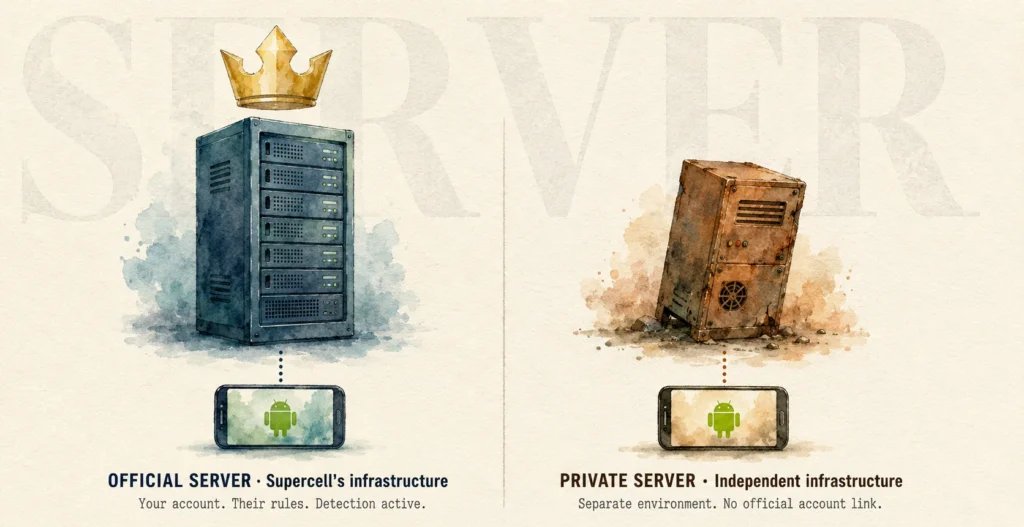
- Modified APKs are patched versions of the official Clash Royale app. Someone reverse-engineers the original APK, edits the code to unlock resources or remove restrictions, then repackages it. Install it and you’ve got unlimited gems, gold, all cards unlocked — whatever the patcher built in. The catch? You’re still connecting to Supercell’s servers. Which means detection is very much on the table.
- Private servers are a different beast entirely. They run on independent infrastructure — nothing to do with Supercell. You’re essentially playing a parallel version of the game with other mod users. Your official account isn’t involved at all (or shouldn’t be — more on that later).
A few things worth knowing before going further:
- Neither type is endorsed or permitted by Supercell.
- Modified APKs carry significantly higher ban risk than private servers.
- Private servers vary wildly in quality — some are passion projects maintained by small teams, others disappear overnight.
- Both exist in a legal grey zone at best, a clear ToS violation at worst.
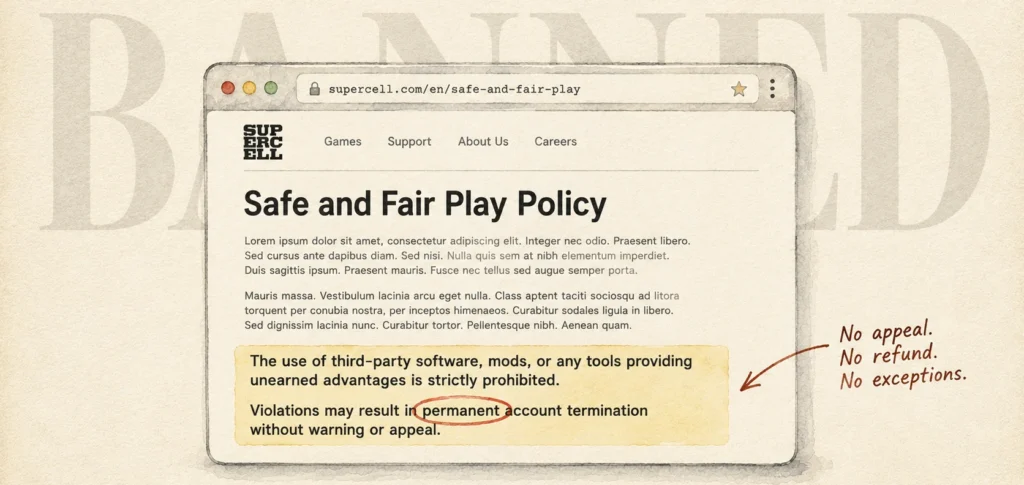
Supercell’s Safe and Fair Play policy is blunt about it. Mods, hacks, third-party software, bots — all explicitly banned. Consequences range from temporary suspensions to permanent bans with no appeal process. And it’s not just Clash Royale — a banned Supercell ID can take down your Clash of Clans, Brawl Stars and other linked accounts too.
Popular Clash Royale Mods and Private Servers in 2026
People keep asking which ones actually work right now. Here’s an honest rundown based on what the community’s been discussing across Reddit threads like r/clashroyalemodding and various Android forums.
Private Servers Worth Knowing About
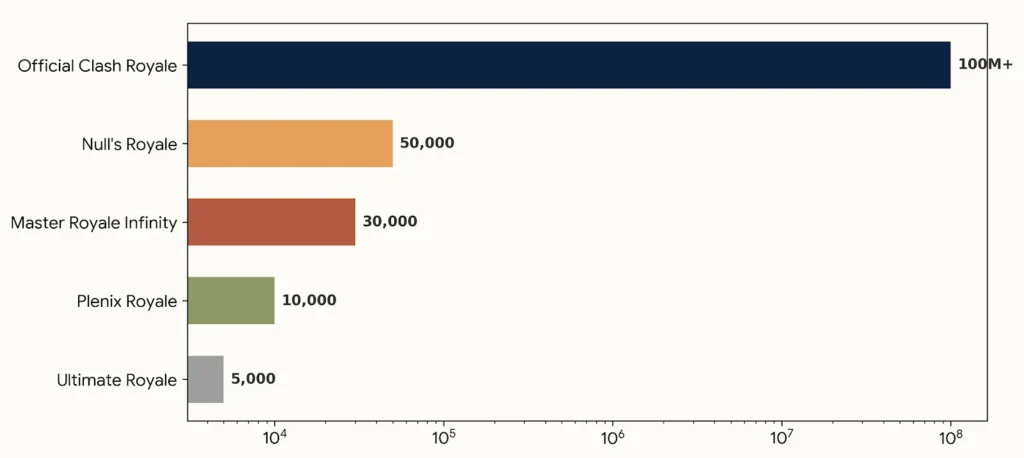
| Server | Key Features | Current Status | Risk Level |
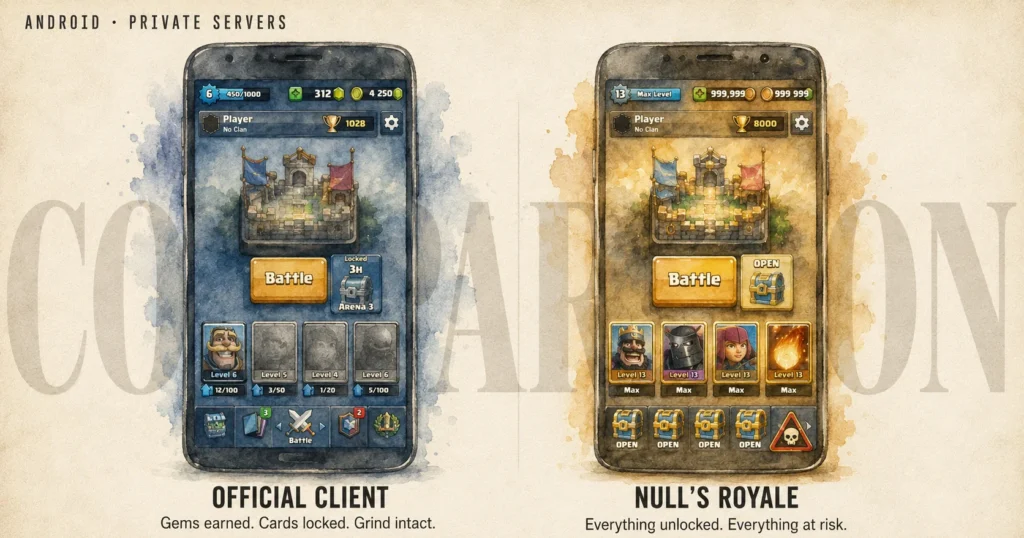
| Null’s Royale | Unlimited resources, custom cards, new heroes/evolutions, multiplayer | Active (~v14.593.1 as of mid-2026) | Medium — separate from official account |
| Master Royale Infinity | Maxed content, events, unlimited gems/gold | Active, past stability issues | Medium |
| Plenix Royale | Custom cards, private matchmaking, free resources | Active, smaller community | Medium-Low |
| Ultimate Royale | Similar unlimited setup, custom modes | Intermittently active | Medium |
| Modified APKs (general) | Patches official client — unlimited everything | Frequently updated on sites like APKTODO, Modyolo | High — connects to Supercell servers |
Null’s Royale is probably the most established of the bunch. It’s been running for years, has a dedicated player base and even claims it’s own anti-cheat system — which is a bit ironic but speaks to how seriously some of these communities take their own competitive integrity.
That said, smaller communities mean worse matchmaking. You’re not playing against millions — more like thousands, sometimes less. And when a private server shuts down (which happens), your progress goes with it. No backup, no refund, nothing.
Modified APKs — The Riskier Option
Sites like APKTODO, Modyolo and An1 regularly host versions matched to current game updates. They look professional. Some even have “verified” badges. None of that means they’re safe — we’ll get into exactly why in the next section.
If you’re curious about the modding scene from a technical standpoint, Wikipedia’s overview of APK files is a decent starting point for understanding what’s actually being modified.
Major Risks: Malware, Bans, Security Threats & Data Theft
Here’s the section most mod guides quietly skip past with a single line like “download at your own risk.” That’s not good enough. These risks deserve the full picture.
The Malware Problem Is Worse Than You Think
Unofficial APKs are one of the most common malware delivery methods on Android. Full stop. The Australian Cyber Security Centre specifically flags sideloaded APKs as a primary vector for mobile malware and that’s not theoretical, that’s documented in real incidents.
What actually happens when you download a modded APK from a random site?
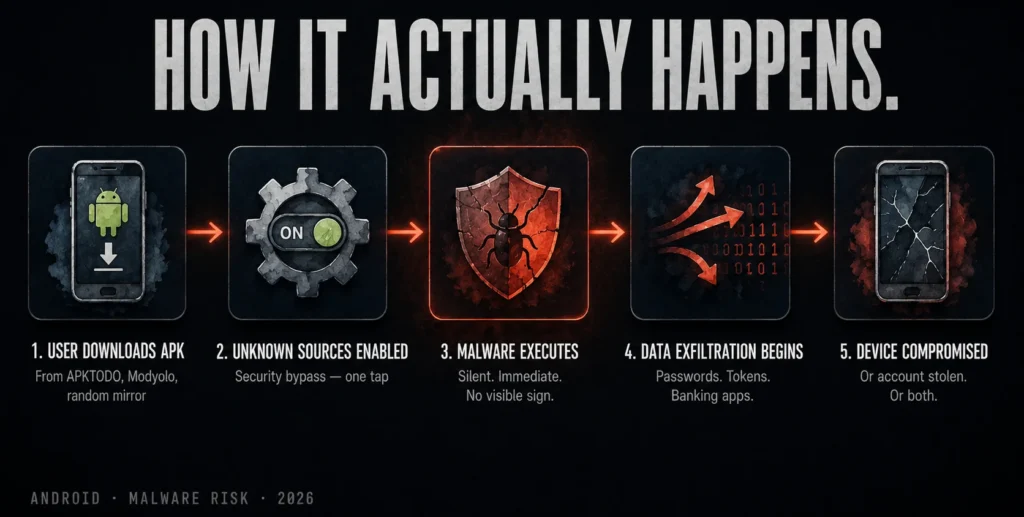
The file goes through zero security vetting. Google Play Protect doesn’t scan it before installation. You’re trusting a stranger’s repackaged code on your personal device.
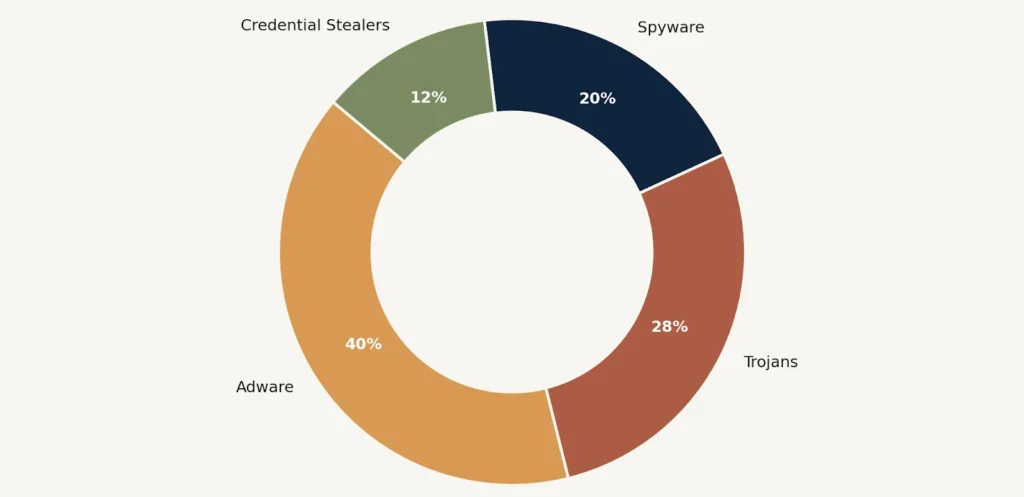
Common threats hiding inside modded APKs:
- Trojans that run silently in the background, logging keystrokes or stealing saved passwords.
- Adware that hijacks your browser, serves aggressive ads or redirects searches.
- Spyware collecting device data, location, contacts — sometimes sold to third parties.
- Credential stealers targeting Google accounts, banking apps, anything stored locally.
- Ransomware — rare but documented in Android APK ecosystems.
And the “verified” badges on sites like Modyolo or APKTODO? Those are self-issued. There’s no independent security audit behind them. Reddit users in r/androidapps have flagged multiple instances of previously “clean” APK sites later serving infected files after ownership changes. It happens more than you’d expect.
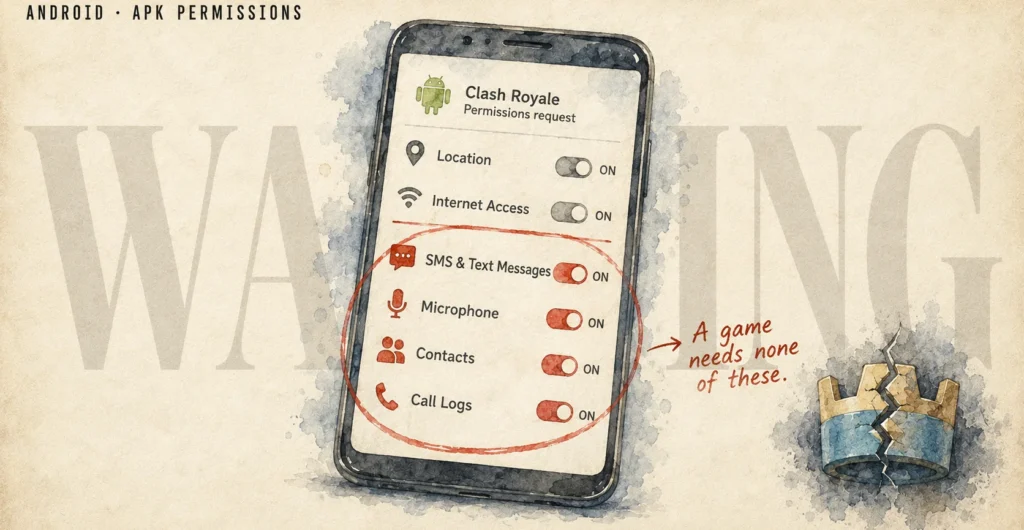
One practical check before installing anything — look at the permissions it requests. Clash Royale needs internet access and storage. It does not need access to your SMS, contacts, microphone or call logs. If a modded version asks for those? Walk away immediately.
Bans — And Why They Hit Harder Than Expected
The ban risk with modified APKs isn’t just “you might lose your Clash Royale account.” Supercell links games through Supercell ID. One ban can cascade.
Here’s the realistic breakdown:
| Action | Ban Risk | Scope |
| Using modified APK on main account | Very High | Clash Royale + linked Supercell games |
| Playing on private server (separate account) | Low-Medium | Private server only — main account safe if not linked |
| Buying gems from third-party sellers | High | Full Supercell ID ban |
| Sharing mods/hacks in-game chat | Medium | Account warning or suspension |
Supercell’s detection isn’t just reactive either. Automated systems flag unusual resource patterns, client anomalies and behaviour that doesn’t match normal gameplay progression. Manual reviews happen too, especially anywhere near leaderboards.
No appeal, no refund, no exceptions — that’s the stated policy and it’s enforced exactly that way.
Data Theft Beyond Your Gaming Account
This part gets overlooked because people think in silos — “it’s just a game account.” But your Android device isn’t just a game device. A compromised APK can reach:
- Saved Wi-Fi passwords.
- Autofill credentials stored in Chrome or your browser.
- Google account tokens (which can bypass 2FA in some cases).
- Banking app data if security is weak.
The Electronic Frontier Foundation’s guide on mobile security covers exactly how permission abuse works in practice. Worth a read if you want to understand the full scope.
How to Install Clash Royale Mods on Android (Step-by-Step With Safety Tips)
Look — people are going to try this regardless. So here’s how to do it with the least possible damage to your device and your data. This is for educational purposes and every step comes with the honest risk attached to it.
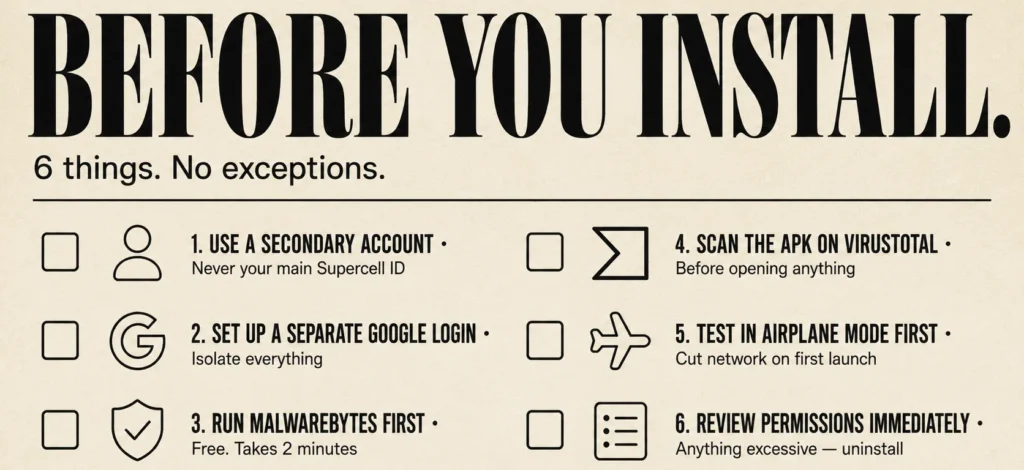
Before anything else:
- Never use your main Supercell account.
- Set up a secondary Google account specifically for this.
- Run an antivirus scan after every install — Malwarebytes for Android is free and genuinely useful.
- Consider a secondary cheap Android device if you’re serious about keeping your main device clean.
Step-by-Step Installation (General Process)
- Uninstall the official Clash Royale app if the mod APK shares the same package name — conflicts will cause installation failure or worse, silent errors.
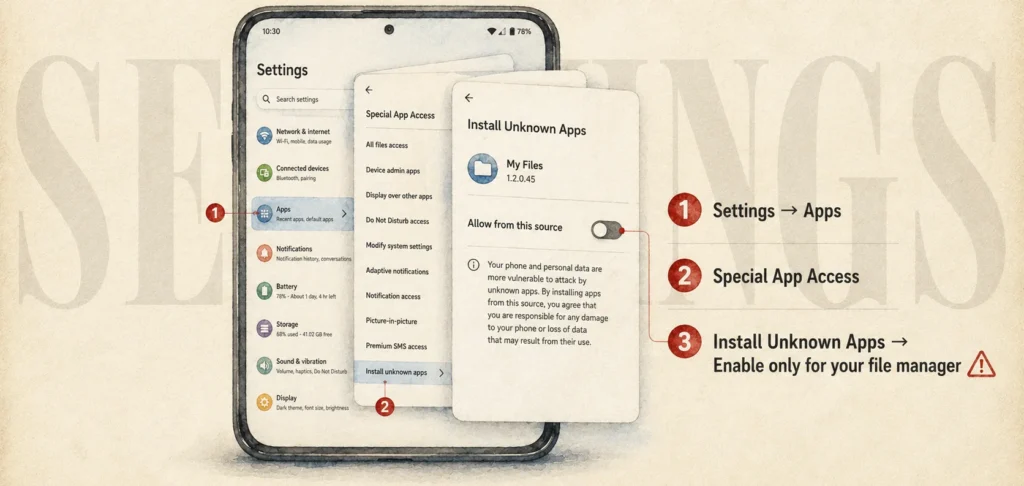
- Go to Settings → Security → Install Unknown Apps and enable it only for your file manager or browser — not system-wide.
- Download the APK from whichever source you’ve researched — check recent Reddit threads for current community feedback on specific files before downloading.
- Scan the file before opening it — upload it to VirusTotal first. Not perfect, but catches known threats.
- Install and test in airplane mode initially — some malware only activates on network connection.
- Review permissions immediately after install — anything that looks excessive, uninstall right away.
For private servers specifically — Null’s Royale and similar ones usually have their own APK on their official site or linked community pages. Don’t search Google and click the first result. Go directly to the community (usually a Discord or dedicated site) and get the link from there. Third-party mirrors are where the compromised versions tend to live.
After installation:
- Re-disable unknown sources installation immediately.
- Don’t log in with your real Supercell ID under any circumstances.
- Monitor your device’s battery and data usage — unusual spikes can indicate background activity.
Legal and Ethical Considerations + Supercell’s Official Policy
Nobody really wants to read the legal section. But this one’s actually worth understanding — because “it’s just a game” doesn’t quite cover what you’re agreeing to when you tap install.
What Supercell’s ToS Actually Says
Supercell’s Terms of Service and Safe and Fair Play policy are pretty unambiguous. No mods, no third-party software, no bots, nothing that gives unearned advantages. Violating these terms voids any right to your account, your purchases, your progress — everything.
That means the $50 you spent on gem packs? Gone. No recourse. Supercell isn’t legally obligated to compensate you for a self-service ban.
Is It Actually Illegal?
This is where it gets nuanced. Using mods isn’t criminal in most jurisdictions — you’re unlikely to face legal prosecution for installing Null’s Royale. But a few things genuinely are in legal grey or outright problematic territory:
- Reverse engineering the official APK potentially violates the Computer Fraud and Abuse Act (US) or equivalent legislation elsewhere — Stanford’s overview of CFAA explains the scope well.
- Distributing modified APKs is a clearer copyright violation under DMCA and similar frameworks globally.
- Using mods in ways that affect other players on official servers crosses from personal use into something Supercell can pursue more aggressively.
As a player using a private server for personal entertainment? Legally speaking, you’re in murky but relatively low-risk territory. Legally speaking. The ToS consequences are a separate matter entirely and those are guaranteed if caught.
The Ethics Side — Worth a Thought
Private servers are self-contained. You’re not ruining anyone’s ranked match or inflating leaderboards. That’s a reasonable argument and plenty of players make it.
Modified APKs on official servers though? That’s different. Someone grinding legitimately for months to reach a trophy milestone — a mod user blows past it in a weekend with unlimited resources. That affects real people’s experience.
The competitive integrity argument isn’t just corporate PR. It’s why even private server communities often implement their own anti-cheat. They care about fair play within their ecosystem, which is genuinely interesting when you think about it.
Safe & Legitimate Alternatives to Mods
So what if you just want to actually enjoy Clash Royale without the two-year grind wall or gambling your device security? Turns out there are real options.
Play Smarter, Not Harder
The grind in Clash Royale is real — but it’s also beatable with the right approach. Most top ladder players aren’t spending hundreds of dollars. They’re playing efficiently.
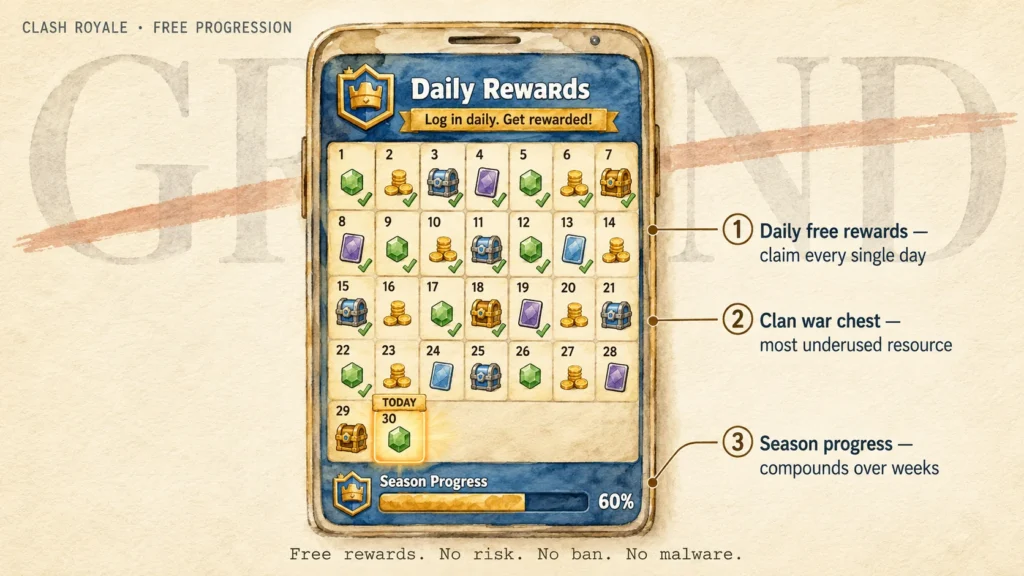
A few things that actually move the needle:
- Daily free chests and crown chests — sounds obvious, but consistently collecting these compounds fast over weeks.
- Pass Royale — the official battle pass is genuinely good value compared to gem packs if you’re going to spend anything at all.
- Clan wars participation — war rewards are some of the best resource income in the game and most players underutilise them.
- Smart card focus — maxing one or two meta decks completely beats having mediocre versions of every card.
Tools the Community Actually Uses
These are legitimate, trusted resources that serious players rely on:
| Tool | What It Does | Link Type |
| RoyaleAPI | Deck stats, meta analysis, player history | Official community tool |
| StatsRoyale | Card rankings, chest tracking, clan stats | Community-built, widely trusted |
| Clash Royale subreddit | Meta discussion, deck sharing, game updates | r/ClashRoyale |
| Royale.coach | Personalised deck recommendations | Freemium coaching tool |
Emulators for a Different Experience
Want to play on a bigger screen with keyboard controls? BlueStacks runs the official Android version on PC — no modding required, no ToS violation, full access to your real account. It’s a surprisingly good experience for a game that benefits from precise card placement.
Secondary Accounts for Experimentation
Want to try off-meta decks without tanking your trophy count? Make a second account. Completely legitimate, officially permitted and lets you experiment freely. Not as immediately satisfying as unlimited everything — but your main account stays clean and your device stays secure.
Final Advice
Seven years writing about Android mods and the honest answer hasn’t really changed: the appeal is completely understandable and the risks are genuinely serious.
Private servers like Null’s Royale occupy a specific niche — they let you experiment with maxed content, test card combinations you’d never afford legitimately and play in a community that’s specifically there for the same reasons. If you’re going that route, at minimum: separate account, separate Google login, source your APK directly from the community, scan everything and never touch your main Supercell ID.
Modified APKs on official servers? The risk-reward math just doesn’t work. Detection is real, bans are permanent and the malware exposure from random APK sites is a genuine threat to your device and personal data — not just your game account.
A few things worth remembering before you decide anything:
- No mod site is fully trustworthy — even ones with good reputations have served compromised files after ownership changes.
- A Supercell ID ban hits every game you play, not just Clash Royale.
- Legitimate progression tools and smart grinding close the gap more than most players realise.
- If something gets compromised, you won’t necessarily know immediately — malware often runs quietly.
The game’s genuinely more fun when your wins feel earned. That’s not a corporate talking point — ask anyone who’s hit Legendary Arena through actual skill and deck knowledge. The satisfaction is completely different.
Play smart, keep your device clean and make informed decisions. That’s really all this comes down to.