 Rafael Weiss ( Androind Engineer )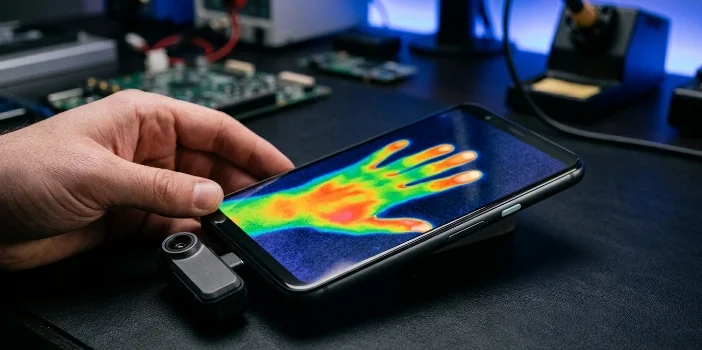
TL;DR: An IR camera for Android detects infrared light — either for artistic night photography (near-infrared) or actual heat mapping (thermal). Most people want thermal. You’ll need an external USB-C attachment since almost no Android phone has one built in. Best overall: InfiRay P2 Pro (~$300). Best budget: VEVOR (~$150). Best professional: FLIR ONE Edge Pro (~$550). Read on for the full breakdown.
Your Phone Can’t See This — But IR Cameras Can
Here’s something most people don’t realize. Your Android camera already has an infrared sensor of sorts — it’s just intentionally blocked. There’s a filter sitting in front of the sensor called an IR-cut filter and it’s only job is to stop infrared light from reaching the sensor. Why? Because infrared messes with color accuracy. Remove it or route around it and suddenly your phone is seeing a whole different layer of the world.
Infrared light sits just beyond the red end of the visible spectrum. You can’t see it. But it’s everywhere — radiating off your body, your walls, your car engine, your coffee cup. Different objects emit different amounts of it depending on their temperature and surface material. A thermal camera essentially translates that invisible data into something your eyes can process — usually a colorized heat map.
The physics behind it aren’t that complicated. Infrared radiation travels in longer wavelengths than visible light — roughly 700 nanometers on the near-infrared end, stretching all the way to 1 millimeter for far-infrared. Thermal cameras work in the far-infrared range, using a sensor called a microbolometer that measures temperature pixel by pixel rather than capturing reflected light like a normal camera does.
Quick myth to kill off here — the “X-ray vision” thing. People keep assuming thermal cameras can see through walls or clothing. They can’t. What they detect is surface radiation only. The reason some thin synthetic fabrics show unusual results under near-infrared is diffraction — IR’s longer wavelength can penetrate certain materials that block visible light. The OnePlus 8 Pro ran into exactly this controversy in 2020 with it’s “Photochrom” filter mode, which showed unexpected see-through effects on some fabrics. OnePlus disabled the feature remotely within days. It wasn’t a thermal camera — it was a near-infrared sensitive sensor with a visible-light blocking filter and the result was unintended.
Near-Infrared vs. Thermal — These Are Not the Same Thing
This is where a lot of buying mistakes happen. Someone searches “IR camera Android,” finds a cheap night-vision attachment, buys it expecting to scan their walls for heat leaks and ends up with something that’s basically a black-and-white camera for dark environments. Different tools entirely.
Near-Infrared (NIR)
Near-Infrared (NIR) cameras detect light that’s just outside what your eye can see. Think of it less as heat detection and more as seeing in a different color. Foliage goes bright white under NIR because chlorophyll reflects near-infrared strongly. Skin looks different. Skies go dark. It’s genuinely beautiful for photography — almost dreamlike — but it tells you nothing about temperature.
Built-in NIR cameras on Android phones are rare. The Ulefone Armor 28 Pro is one of the few current examples, pairing a sensitive NIR sensor with an IR illuminator for genuine night vision in complete darkness. Some people DIY this by taping an IR-pass filter over their existing camera lens — it works, technically, but you’re dealing with very long exposure times since you’re starving the sensor of most light.
Thermal Imaging
Thermal imaging is a different category altogether. These cameras use a microbolometer sensor — a grid of tiny heat-sensitive elements — where each pixel measures actual temperature. The camera software then assigns colors to temperature ranges, giving you that signature orange-and-blue heat map. Critically, these don’t need any light at all. They’re detecting emitted radiation, not reflected light.
| Feature | Near-Infrared (NIR) | Thermal Imaging |
| Detects | Reflected near-IR light | Emitted heat (far-IR radiation) |
| Measures temperature | No | Yes |
| Works in total darkness | Only with IR illuminator | Yes, completely |
| Built into Android phones | Rarely (Ulefone Armor 28 Pro) | Almost never |
| External attachment needed | Sometimes | Almost always |
| Primary use | Night photography, artistic | Inspection, diagnostics, security |
| Price range | $30–$150 | $150–$550+ |
For Android specifically, thermal cameras are almost exclusively external USB-C attachments. They’re self-contained units — their own sensor, their own processor — and the phone is essentially just the screen and the app. That’s actually useful because it means one decent thermal attachment can move between phones as you upgrade.
The Apps: Because Hardware Means Nothing Without Good Software
The attachment is only half the equation. The app is where you actually control what you’re seeing — color palettes, temperature spotting, image capture, analysis. And honestly, most thermal camera apps are mediocre. A few are genuinely good. Here’s the real picture.
| App | Works With | What It Does Well | Worth Noting |
| FLIR ONE | FLIR ONE series (Gen 3, Pro, Edge) | MSX image enhancement, cloud sync via FLIR Ignite, spot temperature measurement | Most mature app in the category. Regular updates. |
| P2 Pro | InfiRay Xinfrared P2 Pro | Image-in-image overlay, min/max temp tracking, multiple palettes | Clean UI, does what it needs to without bloat |
| TargetIR | GUIDE IR scopes and monoculars | Remote device control, OTA firmware updates, video recording | Mixed user reviews — connectivity complaints come up regularly on forums |
| MobIR | MobIR thermal accessory | Real-time temp measurement, cloud functions, multi-language support | Solid mid-tier option, competes well on features |
| Hikmicro | Hikmicro camera range | Professional inspection workflows, report generation, firmware management | Built for field professionals, less casual-friendly |
Reddit threads in r/FLIR and r/homeinspection are genuinely useful here — real users comparing app behavior across firmware versions, reporting bugs, sharing palette preferences. Worth a look before committing to any specific hardware-app combo.
One thing nobody talks about enough — palette choice matters more than people expect. Iron palette is the default on most apps and works fine for general use. But for electrical inspection, high-contrast palettes like Rainbow or Arctic make hotspots jump out faster. The better apps let you swap on the fly. The worse ones bury it in settings or lock you to one option.
Top Android Thermal Cameras Compared
Right, the part most people scrolled here for.
The market has shifted a lot in the last two or three years. FLIR dominated for a long time — they still make excellent hardware — but Chinese manufacturers like InfiRay, TOPDON and HIKMICRO have closed the gap significantly on resolution and features while undercutting on price. For a hobbyist or small contractor, spending $550 on FLIR ONE Edge Pro is hard to justify when a $300 InfiRay P2 Pro actually beats it on raw IR resolution.
| Model | IR Resolution | Frame Rate | Price (approx.) | Best For |
| FLIR ONE Edge Pro | 160×120 | 8.7Hz | ~$550 | Professional flexibility, wireless detachable design |
| InfiRay P2 Pro | 256×192 | 25Hz | ~$300 | High-res inspection, DIY, compact builds |
| TOPDON TC002C Duo | 256×192 | 25Hz | ~$300 | Dual-camera overlay, versatile everyday use |
| TOOLTOP M7 | 256×192 | 25Hz | ~$200 | Outdoor/long-range, rugged metal build |
| VEVOR models | 256×192 (512×384 super-res) | 25Hz | ~$150–250 | Best value entry point |
| FLIR ONE Gen 3 | 80×60 + MSX | 8.7Hz | ~$200 | Budget entry into FLIR ecosystem |
Few things worth unpacking from that table.
The FLIR ONE Edge Pro’s resolution is actually lower than everything else at that price — 160×120 vs 256×192 on competitors costing nearly half as much. What you’re paying for is the wireless detachable design, build quality, MSX enhancement and FLIR’s ecosystem. If that matters for your workflow, it’s worth it. If you just want to find where your house is leaking heat, it’s probably not.
The InfiRay P2 Pro at 9 grams is almost absurdly small. It just hangs off your USB-C port. There’s a macro lens accessory available separately which makes it genuinely useful for close-up PCB inspection — something most competitors don’t offer at this price.
VEVOR is interesting. The super-resolution mode pushing to 512×384 is software-assisted, not native — basically interpolation — so take that spec with appropriate skepticism. But at $150 for a 256×192 native sensor, the underlying hardware is legitimate. The software is rougher than FLIR or InfiRay but functional. For a homeowner who wants to run a heat-loss check once a year, it makes total sense.
TOOLTOP M7’s manual focus is underrated for outdoor use. Auto-focus thermal cameras struggle at distance — the M7’s 10mm manual focus lens lets you dial in on a subject 50+ meters away cleanly. Wildlife observers and hunters specifically mention this in community discussions.
For Developers: Building on Top of Thermal Hardware
If you’re looking to build something custom rather than use an off-the-shelf app, the ecosystem is workable — not perfect, but workable.
Three main SDK paths:
FLIR Mobile SDK is the most documented. It gives you API access to thermal stream data, temperature measurement functions and image processing tools across the FLIR ONE and iXX camera range. Their developer portal has Android-specific guides and sample projects. It’s the obvious starting point if FLIR hardware is in scope.
Hikvision SDK goes deeper on the professional side — full control over device functions, live data stream processing, image handling. More complex to implement but more capable for enterprise-grade applications.
Topdon/Infisense SDK is less publicized but worth knowing about. There’s an open-source project on GitHub — the IRCamera repo — that documents actual SDK integration for the Topdon TC001, replacing an earlier approach that used reflection-based method calls. Messy history but the current state is cleaner.
For cameras without dedicated SDKs, the Android USB Host API is your foundation. The general pattern: detect device attachment via broadcast receiver, request USB permission from the user, open the device interface, then manage data transfer on a background thread. It’s more involved than using a polished SDK but gives you hardware-level access to almost anything that connects over USB-C.
For IR blaster work — transmitting IR signals rather than receiving them, think universal remote control apps — the GitHub project iodn/android-ir-blaster is a reasonable reference point. Different use case from thermal imaging entirely but comes up often in the same searches.
Quora threads on getting started with Android thermal camera development are patchy but occasionally surface real developer experiences — the kind of “I tried this and it failed because of X” detail that documentation never includes.
Real-World Uses: From Chasing Heat Leaks to Finding the Cat
thermal cameras sound like professional equipment — and they are — but the actual range of people buying these things is wider than you’d expect. Contractors, yes. But also hobbyists, hunters, parents, amateur electricians, people who just bought an old house and are suspicious about the heating bill.
Here’s honestly how the use cases break down.
Professional and Industrial
Home inspection is the big one. A thermal camera on a walkthrough will show you insulation gaps, air leaks around window frames, moisture intrusion behind walls — things that are completely invisible otherwise. A cold blue patch on an otherwise warm wall at 2am is a problem. You’d never find it with a regular camera or even a trained eye.
Electrical work is where thermal cameras have probably prevented the most actual disasters. Overloaded circuits, failing breakers, loose connections — they all generate heat before they generate smoke. Running a quick thermal scan across a breaker panel takes two minutes and can catch something that would otherwise go unnoticed until it doesn’t.
HVAC diagnostics, automotive repair, building diagnostics for underfloor heating or hidden plumbing — all legitimate professional applications that the right thermal attachment handles well.
Outdoor and Recreational
Wildlife observation is a genuine use case. IR doesn’t disturb animals the way visible light does — no torch beam, no reaction. Hunters use thermal for spotting game in low light. Conservationists use it for nocturnal species monitoring. Search and rescue teams use it in smoke, fog and darkness where standard optics are useless.
Night navigation around a campsite, scanning a property perimeter, checking whether something moved in the dark — these are real reasons people buy mid-range thermal cameras and actually use them regularly.
Daily Life
Finding a pet hiding under furniture by their heat signature is genuinely one of the most common things people mention in user reviews. Sounds trivial. Actually useful at midnight when the cat has gone quiet and you can’t find her.
Checking on a sleeping child without turning on a light. Verifying whether a pan or grill surface has actually cooled down before touching it. Spotting a fever on a family member. None of these require a $500 camera — a $150 VEVOR handles all of it fine.
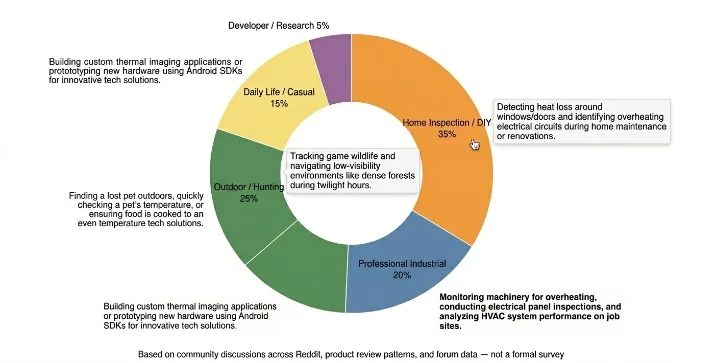
The spread matters because it affects which camera actually makes sense for your situation. A home inspector running thermal scans daily needs something durable with good software and reporting features — that’s FLIR or Hikmicro territory. Someone who wants to check their attic insulation once and maybe spot wildlife on camping trips? VEVOR or TOOLTOP, no question.
What’s Coming: Under-Display IR and Heat Vision for Everyone
The external attachment model works but it’s awkward. A dongle hanging off your phone isn’t elegant. The direction the industry is clearly moving — slowly, but moving — is integration.
The most talked-about development right now is under-display infrared for facial recognition. Leaks pointing toward the Google Pixel 11 suggest it may bring back IR-based face unlock — something Pixel devices actually had with the Pixel 4 back in 2019 before Google quietly dropped it. If accurate, this would put Face ID-level biometric security into Android’s flagship line, using an IR camera embedded beneath the display rather than a visible-light selfie camera. That’s a meaningful security upgrade — IR-based face recognition is considerably harder to spoof with a photograph than standard 2D face unlock.
Whether it ships or not, the direction is clear. IR belongs inside the phone eventually, not dangling off the bottom of it.
On the accessory side, FLIR ONE Edge’s wireless detachable design is the current peak of the external attachment category. No cable, attaches magnetically, pairs over Bluetooth. You can hold the camera at arm’s length while the phone stays in your other hand — actually useful for scanning ceiling areas or awkward spaces during inspection work.
The price curve on high-resolution thermal is the other story worth watching. 256×192 sensors were $500+ three years ago. They’re $150 now from VEVOR. That’s not a gradual decline — that’s the same pattern that played out with action cameras, drones and dash cams. Give it another two or three years and genuinely capable thermal imaging will be cheap enough to include in more mid-range rugged phones by default, not just flagships.
That matters for industries like construction, agriculture and field services where thermal diagnostics are useful but the current cost-per-device makes wide deployment impractical. Once the hardware cost drops below a certain threshold it stops being a specialized tool and starts being a standard feature.
Final Thought
IR cameras on Android aren’t niche anymore — not really. The hardware got affordable, the software got usable and the use cases turned out to be broader than anyone expected when FLIR first launched the ONE back in 2014.
If you’re buying: InfiRay P2 Pro is the sweet spot for most people right now. Best resolution at the price, small enough to leave attached, software that doesn’t get in the way. Step up to FLIR ONE Edge Pro if you’re doing professional work and need the wireless flexibility. Step down to VEVOR if budget is the primary constraint — the core hardware holds up.
If you’re building: FLIR Mobile SDK for FLIR hardware, USB Host API for everything else and spend some time in the GitHub repos before reinventing anything.
And if you’re just curious what your walls look like at 2am — honestly, it’s worth finding out. Old houses especially. You might be surprised what’s been hiding in plain sight, just slightly warmer than everything around it.