apk
apk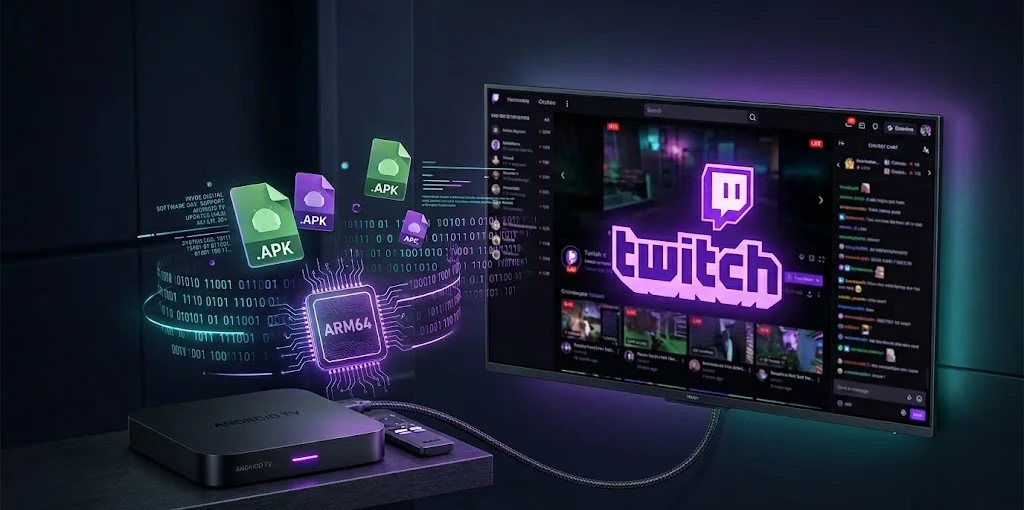
You Googled something like Twitch Android TV APK arm64-v8a and have landed here. Perhaps the application will not appear in the Play Store of your TV. Perhaps you have a budget Android TV box that technically supports Android, but does not work well with the Google ecosystem. Or perhaps you are simply the type of person who prefers knowing what is on their device – what architecture, what build and what version.
Either way, there’s a lot to untangle. The Twitch situation on Android TV is messier than it looks from the outside and 2026 specifically is an interesting year to be asking about sideloading because Google just rewrote the rules in a pretty significant way. More on that later.
Let’s start from the top.
Why People Are Searching for This in the First Place
The honest answer? The official Twitch Android TV app is kind of a disaster.
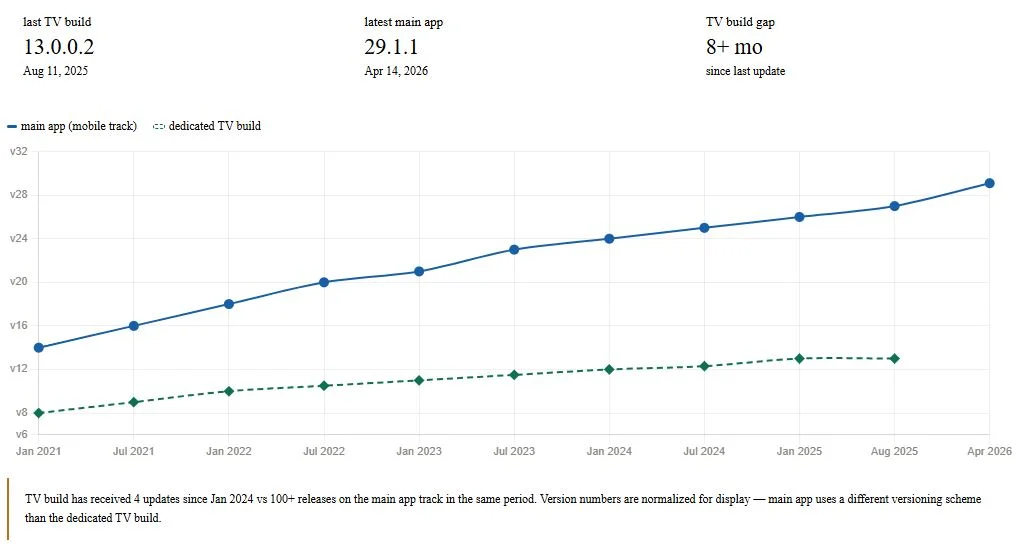
It is nothing of a hot take, it is merely what the community has been saying over years. It is characterized by Reddit posts dating as far back as 2021, as something that is unusable as a way to watch. The input of chats is cumbersome and there is reconnect problem, advertisements are acting strangely and the frequency of updates on the dedicated TV version is practically stagnant. The APKMirror-hosted Android TV-specific app, an independent, Leanback-friendly version, is at version 13.0.0.2, a release that regressed on August 11, 2025. Between updates, that is more than eight months, today.
Compare that to the main Twitch app, which pushed 29.1.1_BETA (the arm64-v8a, 320–640dpi variant for Android 8.0+) as recently as April 14, 2026 — literally yesterday. Same package name (tv.twitch.android.app), different build track, very different pace.
Therefore, there are a few reasons why people might go in search of the arm64-v8a APK: their TV box does not show Twitch in the Play Store, they are seeking a certain beta or they have heard that architecture-specific builds work better than the universal fallback. All these are valid reasons. The arm64-v8a part in particular, is something you actually want to comprehend before you sideload anything, so we shall dive into it.
What arm64-v8a Actually Means (and Why It Matters on Your TV)
Quick, painless architecture lesson — skip ahead if you already know this stuff.
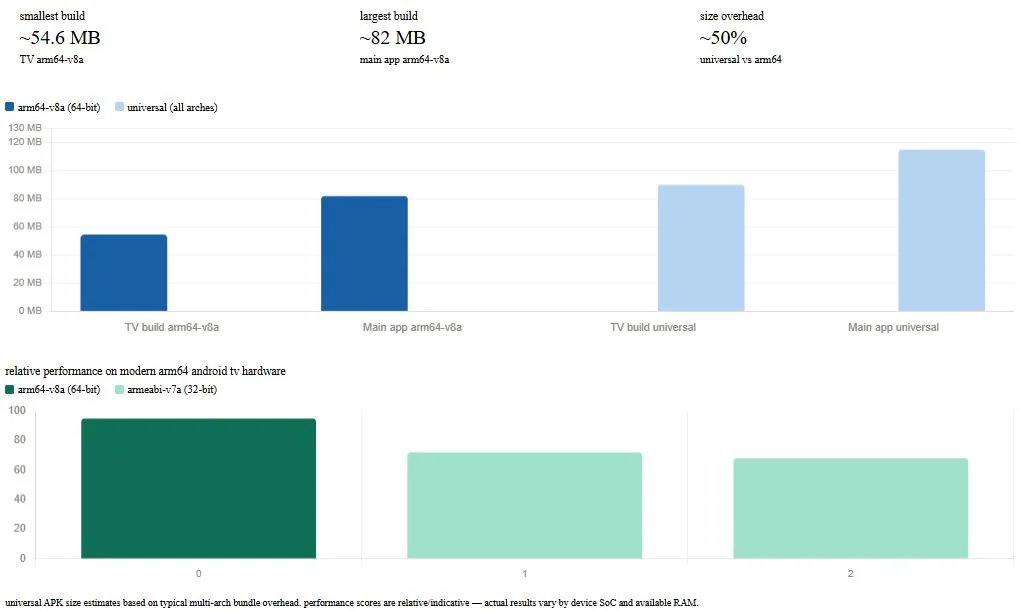
Android applications can be distributed as so-called universal APKs i.e. native code to all supported CPU architectures is packaged into the APK. Easy to distribute and swollen. Alternatively, split APKs, containing only libraries applicable to a particular architecture, can be used by developers. One of these splits is the arm64-v8a split – it has the 64-bit ARM (AArch64) native libraries only.
Why does that matter? A few reasons:
- File size. The dedicated Android TV build at arm64-v8a weighs in at ~54.6 MB. A cross-platform build including arm64 + armeabi-v7a + x86 libraries all jam-packed? Noticeably heavier.
- Performance. The ARMs have 64-bit processors, which can address larger memory addresses. In your Android TV box, whether it is based on Amlogic S905X4, on a MediaTek chip or a Qualcomm SoC, with the arm64-v8a build, the processor is already doing what it is already doing instead of executing 32-bit code using a compatibility layer.
- It has become the norm. Practically all Android TVs released since approximately 2017 use a 64-bit ARM CPU. NVIDIA Shield, Google TV dongles, Amazon Fire TV sticks (current generation), the majority of smart TV Android applications – all arm64-v8a native. In case you are installing a universal APK on one of them, you are not getting any additional value; you are just dragging unnecessary baggage.
One thing to clear up: the arm64-v8a variant isn’t a different app. It’s the same tv.twitch.android.app package, just built for a specific CPU family. When Google Play installs Twitch on a modern Android TV, it’s almost certainly pulling the arm64-v8a split automatically. The reason anyone downloads it manually is to get more control over which build gets installed — or to install it on a device that can’t reach the Play Store.
The Two Twitch Apps: A Confusing Split You Should Know About
Here’s where it gets a bit weird. There are effectively two distinct Twitch APK tracks on APKMirror:
1. The Main App (tv.twitch.android.app)
It is the one that has 500M + downloads on Google Play, the rating of 4.0 and the intensive update rate. As of April 14, 2026, the latest is 29.1.1_BETA — arm64-v8a, 320–640dpi, Android 8.0+, approximately 82 MB. There have been frequent rollouts of betas: 29.0.2 on April 11, 29.0.1 on April 9, etc. The stable releases are a bit behind (26.2.2 was the stable track in September 2025).
Google Play lists this app as compatible with Phone, Tablet, Chromebook and TV. So technically you can install it on Android TV. The problem is it’s not really built for a TV — it’s a mobile-first app that happens to support TV as a form factor.
2. The Dedicated Android TV Build
This is the one from APKMirror’s separate “Twitch: Live Streaming (Android TV)” category. It uses the Leanback UI — proper D-pad navigation, remote-friendly layout, larger touch targets, the works. Latest version: 13.0.0.2, released August 11, 2025, at a much leaner ~54.6 MB for the arm64-v8a build. This is the one purpose-built for TV hardware.
The tradeoff is obvious in the numbers. The TV build is lighter and actually designed for the platform, but it hasn’t seen an update in eight-plus months. The main app gets near-daily beta attention but was built for someone scrolling on a phone.
Here’s a quick comparison:
| Main App (29.1.1_BETA) | Android TV Build (13.0.0.2) | |
| Latest Version | 29.1.1_BETA (Apr 14, 2026) | 13.0.0.2 (Aug 11, 2025) |
| Size (arm64-v8a) | ~82 MB | ~54.6 MB |
| UI Design | Mobile-first | Leanback / TV-native |
| Update Cadence | Frequent (near-daily betas) | Slow (8+ months since last) |
| Min Android Version | Android 8.0 (API 26) | Android 5.0+ |
| Target SDK | Android 14/15 | Older track |
| D-pad Navigation | Functional, not optimized | Purpose-built |
If you’re sideloading specifically to get a good TV experience, the dedicated build is the smarter pick — just know you’re getting something that hasn’t been touched since mid-2025.
Under the Hood: What’s Actually Inside the APK
A lot is being done by the arm64-v8a Twitch APK. Video streaming is not a simple task, particularly with HLS/DASH adaptive bitrate, live chat rendering and all the subscription/channel points UI overlaid on top.
A few things worth knowing if you’re technically curious:
- Video pipeline. The app almost certainly leans on ExoPlayer (or a fork/successor) for video decoding, with hardware acceleration via the device’s SoC media decoder. The arm64-v8a native libs handle the heavy lifting here — this is precisely why the architecture split matters for actual playback smoothness.
- Nielsen tracking. Both builds include Nielsen measurement software for audience analytics. You can opt out in Twitch’s settings (Privacy > Nielsen Measurement), but it’s there by default. Worth knowing.
- Permissions. Standard streaming app fare: network access, storage, microphone (for go-live). Nothing alarming. The APKMirror listing for 13.0.0.2 includes MD5 hashes for every split — always cross-check these before installing anything you didn’t pull directly from Play. The MD5 for the arm64-v8a base split on 13.0.0.2 is 54f108b2f23181d7bf041251d707fe47, for reference.
- Signature verification. APKMirror manually reviews every APK before posting and verifies the developer signature against Twitch Interactive, Inc. It’s one of the few APK repositories I’d actually trust, alongside direct ADB installs from known-good sources.
Sideloading in 2026: Google Just Made It Significantly More Annoying
This is the section that’s going to matter most to you if you’re on a device that can’t pull Twitch from the Play Store directly.
Android has always let you sideload APKs. It was one of the platform’s defining advantages over iOS — flip a toggle, download a file, install it. Simple. That simplicity is going away or at least getting a lot more friction attached to it.
Here’s what changed and why.
The Developer Verification Mandate
Google declared earlier that as of September 2026, all Android applications downloaded onto certified devices should be of certified developers. To get verified, developers releasing apps outside of Google Play need to provide identification, upload signing keys and pay a $25 fee. All apps not verified by an authority (that is, any APK that the developer has not been through that process) will be blocked by default.
The stated reason is scam prevention. According to a 2025 report from the Global Anti-Scam Alliance cited in the Android Developers Blog, 57% of adults experienced a scam in the past year, with global consumer losses hitting $442 billion. A significant chunk of those scams involve someone being coached over the phone to sideload a malicious APK while bypassing security warnings. The 24-hour wait is specifically designed to break that pressure cycle — hard to stay on the phone with a scammer for a full day.
Whether you buy that rationale or think Google is quietly tightening it’s grip on the ecosystem — and over 50 organizations including F-Droid, the EFF and Proton signed an open letter criticizing the mandate on privacy grounds — the rules are coming regardless.
The “Advanced Flow”: Power Users Still Have a Path
Google designed a deliberate multi-step workaround called the Advanced Flow specifically for power users who install apps outside the Play Store. It’s a one-time process, but it was built to be slow by design.
The four-step process works like this: enable developer mode, complete a safety check confirming no one is coaching you, restart your device with re-authentication, then return after the mandatory 24-hour wait for biometric or PIN confirmation.
After that? You can choose to enable unverified installs either for seven days or indefinitely. You don’t need to keep developer mode on to continue installing unverified APKs after completing the flow. That last part is actually significant — banking apps that break when developer mode is active won’t be affected.
The Advanced Flow and limited distribution accounts for students and hobbyists will be available in August 2026, before the new developer verification requirements formally take effect the following month.
A few other things worth knowing:
- The 24 hour waiting period has no effect on adb installs. That workflow is the same, should you be a command-line user.
- Google still has the power to quietly apply updates to it’s own software elements with or without Play Store app updates to manual, so withholding updates will not help you avoid the effect of such updates.
- Android still shows a warning that the app is by an unverified developer upon completion of Advanced Flow.
What This Means for Twitch Specifically
The following is the practicality: Twitch Interactive, Inc. is a proven developer. APKMirror has signed APKs. In the case of sideloading the official Twitch APK by a reputable source such as APKMirror, the developer verification scenario is not as worrisome as it would be with an otherwise random modified APK downloaded off a forum.
The issue is whether APKMirror itself will be considered a “verified” distribution channel under Google’s new framework and that’s genuinely unclear right now. Until September enforcement kicks in and the dust settles, the safest approach remains the same one it’s always been: Google Play first, APKMirror as a trusted fallback, nothing else.
Should You Actually Sideload It? Honest Pros and Cons
Let’s be direct about this. Sideloading Twitch on Android TV isn’t inherently sketchy — but it’s also not always the right call.
Reasons it makes sense:
- Your Android TV box doesn’t have Google Play or Twitch doesn’t appear in your regional store
- You want a specific beta build for a fix that hasn’t hit stable yet
- You need the arm64-v8a split specifically because a universal APK was causing playback issues on your hardware
- You’re running a custom ROM or a de-Googled setup
Reasons to think twice:
- No auto-updates. Every time a new version drops, you’re back to manually pulling the APK and reinstalling. For an app that pushes betas nearly daily, that gets old fast.
- The dedicated TV build (13.0.0.2) hasn’t been touched since August 2025. You’re installing something that’s already eight months behind.
- Community consensus on the official TV app is rough. Chat is difficult to type in, ads don’t behave consistently and there are lingering reconnect bugs that Twitch doesn’t seem in a hurry to fix.
It is the latter that really hurts. You can do all the right things – get the right arm64-v8a build out of an authenticated source, get it installed clean and get the hash verified – and still have a TV app that feels like it was on life support since 2022.
Which is exactly why a lot of Android TV users have moved on entirely.
The Alternative Most People End Up Using: SmartTwitchTV
If you spend any time in Android TV communities, you’ll see this name come up constantly. SmartTwitchTV by developer fgl27 is an open-source, WebView-based Twitch client built specifically for Android TV — and it genuinely outperforms the official app for most use cases.
The latest release as of writing is v3.0.379 (March 17, 2026). It’s available both on the Play Store for TV devices and as a direct APK from the GitHub releases page.
Why does it work better? A few reasons:
- It’s tiny. Under 2 MB in most builds — compare that to Twitch’s 54–82 MB depending on variant.
- D-pad navigation was designed from scratch for TV remotes, not retrofitted from a mobile UI.
- Full chat support, VODs, clips, subscriptions, channel points — the features that matter on a TV are all there.
- It’s actively maintained. fgl27 has been pushing updates consistently while Twitch’s official TV team has apparently been on an extended sabbatical.
- Since it’s web-based under the hood, it also sidesteps some of the native library architecture concerns entirely — arm64-v8a vs armeabi-v7a matters a lot less when you’re running JavaScript through a WebView.
The tradeoff is that it’s a third-party client, not an official Twitch app. It uses Twitch’s APIs, which Twitch could theoretically restrict or break at any point. It also can’t access everything a native app can — going live from your TV isn’t an option, for example. And some users report ad behavior that differs from the official app (sometimes better, sometimes just different).
But for the core use case — sitting on a couch, watching a stream, navigating with a remote — SmartTwitchTV is what the official app should have been years ago.
Disclaimer: “This article is for educational and technical reference only. Always prioritize the official Google Play version of Twitch where available. Sideloading carries inherent risks — use trusted sources, verify file signatures and understand the 2026 sideloading restrictions before proceeding.“