 Rafael Weiss ( Androind Engineer )
Here’s something most people never read: when you purchase an Android device, you don’t own the software on it. You license it. That distinction matters more than you’d think — especially the moment you decide to change how your phone looks.
Android 9.0 “Pie” (API 28) sits at a genuinely interesting legal and technical crossroads. Google, during this release cycle, made a deliberate, documented decision to shut down a popular third-party theming method. Not because it was illegal but because it conflicted with their security architecture and arguably, their growing interest in controlling the customization layer themselves. Users who’d been theming freely woke up one day and couldn’t anymore. No lawsuit, no refund. Just a changelog.
The Native Theming System — What Google Actually Gives You
Android Pie’s built-in theming options are real, but deliberately limited. Understanding why they’re limited is the point.
The Day/Night Toggle
Users on stock Android Pie could navigate to Settings > Display > Advanced > Device Theme and choose between three options:
- Light
- Dark
- Automatic (wallpaper-based switching)
Sounds comprehensive. It isn’t. This toggle didn’t push a system-wide dark mode across all apps. It changed the Quick Settings panel, the volume slider and a handful of other system UI elements. Third-party apps? Unaffected, unless their developers explicitly coded support for it.
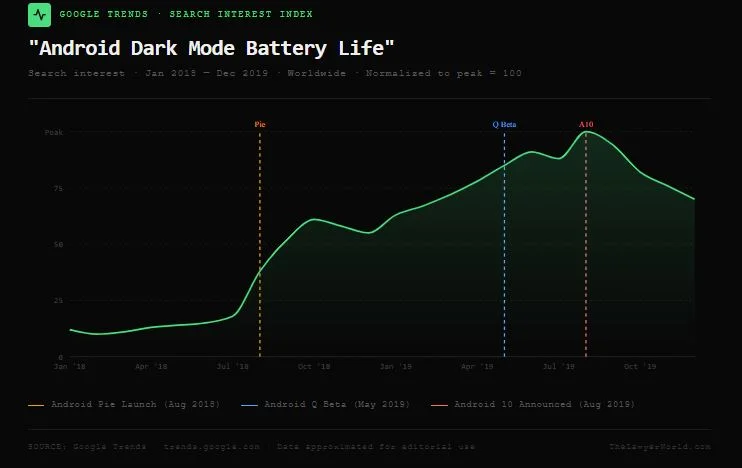
That gap frustrated users and the search data around “Android dark mode battery life” from late 2018 into 2019 reflects exactly that frustration. People wanted full dark mode, partly for aesthetics, partly because on AMOLED screens, true black pixels consume near-zero power.
The Developer Options Night Mode — A Hidden, More Powerful Setting
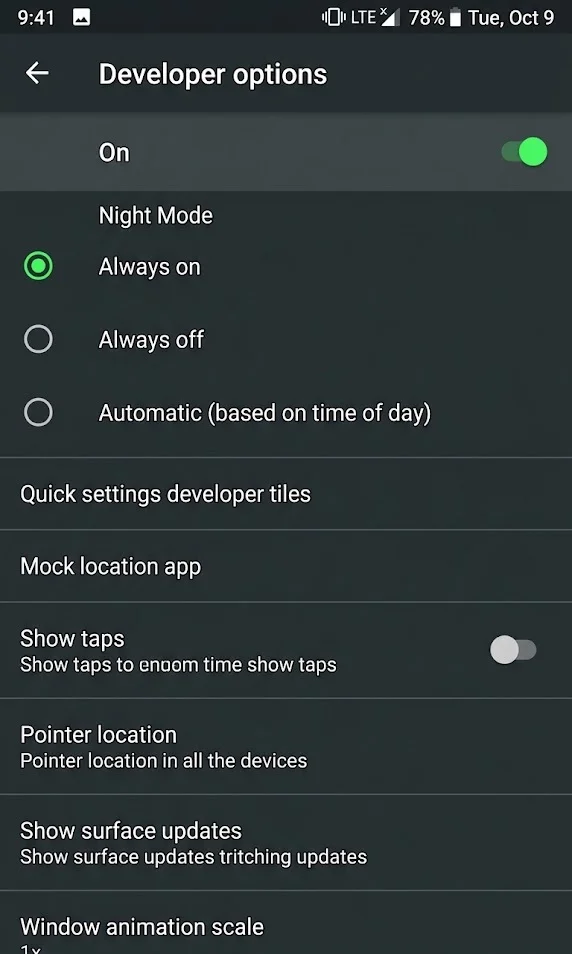
Buried inside Developer Options was a separate “Night Mode” toggle — distinct from the user-facing Device Theme setting. This one had actual teeth. When switched on, it signaled supported Google apps — Messages, Google Phone, Google Contacts to flip to their dark themes. The keyword is supported. Apps that hadn’t been built to listen for that signal ignored it entirely.
This wasn’t an accident or an oversight. It was architecture. Google was building toward something (Android 10’s proper system-wide dark mode) and Pie was the scaffolding stage.
The Overlay Manager Service (OMS) — The Technical Foundation
Under the hood, both of these features run on the Overlay Manager Service or OMS the framework that lets Android swap visual resources dynamically without touching the core APK files of apps. Think of it as a layer sitting on top of installed software, intercepting display calls and substituting themed assets.
OMS had existed before Pie. But in Pie, Google tightened the permissions around it. That tightening is what killed rootless Substratum theming more on that in Section 3.
For now, the relevant point: OMS is legitimate, documented and Google-sanctioned. Anything built on top of it through official channels is fine. Anything that exploited gaps in it’s permission structure, like rootless Substratum did became a casualty of that tightening.
Native Android Pie Theming: At a Glance
| Feature | Available To Users? | Scope | Requires Root? |
| Device Theme (Light/Dark) | Yes — Settings menu | System UI only | No |
| Automatic Theme (Wallpaper) | Yes — Settings menu | System UI only | No |
| Developer Options Night Mode | Yes — hidden, Dev Options | Supported Google apps | No |
| Overlay Manager Service (OMS) | Indirectly | System-wide (with permission) | Depends on use |
Stock Android Pie vs. Manufacturer Skins — Theming Depth Comparison
This is where the gap becomes stark. “Stock Android” — meaning the version Google ships on Pixel devices is the most restricted in terms of user-facing theming. Manufacturers who license Android are free to build on top of it and most do, aggressively.
| Feature | Stock Android Pie (Pixel) | Samsung One UI (Pie) | OnePlus OxygenOS (Pie) | Xiaomi MIUI / Huawei EMUI |
| System-wide Dark Mode | Partial (UI elements only) | Yes — full AMOLED Night Theme | Yes — system-wide | Yes — both have full dark themes |
| Accent Color Customization | No | Limited | Yes | Yes |
| Theme Store | No | Yes (Galaxy Themes) | Yes | Yes (both have dedicated stores) |
| Substratum Compatibility | Broken (rootless) | Partial via Synergy add-on | With root/custom ROM | Limited |
| Rounded UI / Visual Style | Yes (Material Design 2.0) | Yes — curved borders | Yes | Varies by skin version |
Samsung’s One UI rollout with Android Pie was notable specifically because it’s AMOLED dark theme was comprehensive not a UI-element-only toggle. For users on Galaxy devices, this was effectively a better dark mode than what Google offered natively on it’s own hardware. That’s a product decision with a legal dimension: Samsung’s license to Android gives it the right to build this. Google cannot stop them and users benefit.
Material Design 2.0 — The Redesign That Changed What “Theming” Means
Before getting into Substratum and the legal grey zones of third-party theming, there’s a design shift from Android Pie that doesn’t get enough credit for how much it changed the customization conversation.
Google didn’t just update Android Pie’s visuals. They rewrote the rulebook for how Android should look and handed that rulebook to developers and manufacturers simultaneously.
What Actually Changed
The design language that shipped with Pie gets called “Material Design 2.0” informally. Google never used that version number officially, which is telling. It wasn’t a clean successor, it was a philosophical reframe. The first Material Design (2014) pushed uniformity. Every app, every interface, converging toward the same visual grammar. Consistent, predictable and honestly, a bit sterile by 2018.
Material Theming, the Pie-era update, flipped that. The stated goal was to be a “design system for making design systems.” Separation of function from style. A button still behaves like a button but now it’s corners, color and typography are variables a developer or manufacturer can own.
Three visual changes defined what users actually saw on their screens:
- Rounded corners appeared prominently on notifications, menus and dialog boxes — a softer, less angular interface.
- Color variance increased — Google moved toward brighter, more saturated UI palettes.
- Uniformity decreased by design — brands were now encouraged to look distinct rather than blend into a generic Android aesthetic.
Why This Matters Legally and Practically
Here’s the part that rarely gets discussed. Material Theming gave manufacturers explicit design latitude within the Android licensing framework. Samsung building a curved, AMOLED-optimized One UI wasn’t Samsung going rogue, it was Samsung doing exactly what Google’s updated design system invited them to do.
For end users, this created an uneven landscape. Your rights to customize your phone’s appearance depend partly on which phone you bought. A Pixel owner on stock Android Pie had narrower native theming options than a Galaxy owner, despite both running Android 9.0. Same OS version, different licensing outcomes in practice.
This is also the technical foundation that eventually became Android 12’s Material You — the dynamic color system that pulls theme colors from your wallpaper. Pie’s Material Theming was the groundwork. The seeds of personalization-as-a-system-feature were planted here, which is precisely why Google simultaneously started closing off third-party workarounds. They were building toward owning this space officially.
Substratum — The Rise, the Kill Switch and What’s Left
This is the section that actually has legal weight. Everything discussed so far sits comfortably within sanctioned software use. Substratum is where the line gets drawn and where Google drew it deliberately.
What Substratum Was
Substratum was a third-party theme engine built on top of Android’s OMS framework. For enthusiasts, it was transformative. Install a theme from the Play Store, apply it through Substratum and your entire system not just system UI, but apps, menus, keyboards could look completely different. No manufacturer skin required. No waiting for Google to build the feature officially.
The rootless version, which used an add-on called Andromeda, was the breakthrough. It meant ordinary users not just people who’d rooted their phones and voided warranties could access deep theming. At it’s peak, Substratum had a thriving theme marketplace and a dedicated community on r/AndroidThemes.
Then Android Pie shipped.
Google’s Kill Switch — What Actually Happened
Google confirmed it made an intentional change deep within Android’s core that prevented rootless Substratum from functioning on Pie. Not a side effect of other changes. Intentional.
The official framing was security. The Andromeda workaround exploited permission gaps in OMS that Google considered insecure. That’s a defensible position — poorly permissioned overlay systems can be vectors for malicious apps to spoof UI elements, intercept credentials or display fraudulent interfaces.
But there’s a second reading. Google was, at this exact moment, beginning to build it’s own official theming infrastructure. Killing a popular third-party method while constructing a first-party alternative isn’t purely a security story. It’s also a product strategy.
Users had no legal recourse here. The Android license and Google’s terms of service gave them no right to rootless theming. Google’s right to patch it’s own OS — including patches that remove functionality users had come to depend on — is essentially unchallenged under standard EULA frameworks.
What Survived on Pie
Substratum didn’t die entirely. It retreated to a narrower user base:
- Rooted devices: Full Substratum functionality remained available with root access and system modification permissions.
- Custom ROMs: LineageOS, AOSP-based ROMs with full OMS support built in — Substratum worked cleanly here.
- Samsung devices (exception): Unrooted Samsung hardware running stock firmware could still use Substratum Lite paired with an add-on called Synergy, which compiled themes differently, bypassing the restriction that killed Andromeda.
Popular Substratum Themes Still Active on Pie
For users who landed in one of those viable categories, the theme library remained substantial:
| Theme Name | Primary Style | Key Feature | Works On |
| Swift Black | Pitch black backgrounds | 200+ app support, preserves accent colors | Rooted / Custom ROM |
| PitchBlack | Minimalist dark | Multiple color combinations | Rooted / Custom ROM |
| Aurora | Highly customizable | User-controlled accents, dialogs, menus | Rooted / Custom ROM |
| Pi Light | Backport of Pie aesthetics | Brings Pie UI to Android 8.1 devices | Rooted / Custom ROM |
| Transparent Pie/Oreo | Wallpaper-through transparency | Dynamic background via wallpaper | Rooted / Custom ROM |
The Security Argument — Taking It Seriously
It’s worth being fair to Google’s position here. Overlay-based attacks are real. An app with improper overlay permissions can draw invisible layers over legitimate UI — trapping taps, spoofing login screens, intercepting input. The Android security documentation addresses overlay permissions specifically as a known attack surface.
The rootless Substratum method required granting permissions that, in the wrong hands or wrong app context, could expose users. Google’s tightening of OMS permissions in Pie closed that surface. That Substratum was collateral damage doesn’t make the underlying security reasoning wrong.
What it does mean: users who want deep theming on stock, unrooted Android Pie accepted a real security tradeoff when they used Andromeda. That context matters when evaluating whether Google’s kill switch was overreach or responsible platform stewardship.
The Developer’s Obligation — Building Themes That Actually Work on Pie
Most theming guides stop at the user side. This section doesn’t, because the developer decisions made during the Pie era directly determined what users could and couldn’t customize and some of those decisions created real problems that took months to surface.
Supporting Light and Dark — It Wasn’t Automatic
When Google added the system-level Device Theme toggle and the Developer Options Night Mode to Pie, app developers faced a choice: respond to those signals or ignore them. Ignoring them was easy. Responding required work.
The primary tool was AppCompatDelegate.setDefaultNightMode(), an API call that told an app to watch for the system’s night mode state and switch it’s own theme accordingly. Apps that implemented this felt cohesive. Apps that didn’t stuck out immediately, a bright white interface inside an otherwise darkened system UI is jarring and users noticed.
Here’s the thing though: most apps didn’t implement it right away. The Developer Options Night Mode toggle in Pie only reliably triggered dark themes in Google’s own apps, Messages, Phone, Contacts. Everything else was on each developer’s timeline. This is why the Pie dark mode felt incomplete to users. It was incomplete, by design, because adoption was voluntary.
The Material Components Migration
Pie pushed developers toward a specific migration path:
- Away from: Theme.AppCompat — the older compatibility theme system.
- Toward: Theme.MaterialComponents — the updated system aligned with Material Theming.
This wasn’t cosmetic. Theme.MaterialComponents carried new default behaviors around shape, color attributes and typography tokens that Theme.AppCompat simply didn’t have. An app that stayed on the old theme system couldn’t properly participate in the new Material Theming ecosystem, it’s UI would look slightly off compared to apps that had migrated.
For users, this created a patchwork. Some apps on their phone looked distinctly “Pie.” Others looked like they’d been designed in 2015 and never touched since. The OS couldn’t force the migration. Developers had to choose it.
The Plugin Theming Bug — A Specific, Documented Problem
Here’s a raw technical detail that affected a real subset of developers and barely gets mentioned in general Android Pie coverage.
Developers building apps using plug-in frameworks, VirtualAPK being the notable example, hit a specific theming failure on Android 9.0. Themes set for plug-in activities wouldn’t apply. The visual interface would fall back to defaults, breaking carefully designed UI.
The cause traced back to changes in ActivityThread, Android’s core class managing the main thread of an app process and specifically how it handled theme application for activities loaded outside the normal app lifecycle. Google’s Pie changes to that class altered the execution sequence enough that plug-in frameworks, which hook into that lifecycle in non-standard ways, lost their theming hooks.
This wasn’t a Substratum problem or a root problem. It affected legitimate, Play Store-distributed apps built with specific architectural approaches. The fix required framework-level patches from the plug-in library maintainers, not from Google and not from end users. Some apps shipped broken theming on Pie for weeks before patches landed.
Resource Directory Strategy — The Practical Fix
Beyond the bug, developers navigating Pie had a cleaner, supported path for handling theme variation across API levels: structured resource directories.
res/
values/
themes.xml ← default theme, all API levels
values-v28/
themes.xml ← Pie-specific overrides
values-night/
themes.xml ← dark mode variants
values-night-v28/
themes.xml ← dark mode, Pie-specific
Android’s resource selection system handles the rest automatically — serving the most specific matching file for the device’s API level and current day/night state. Clean, maintainable, no runtime logic required.
Developers who set this up properly gave their apps maximum compatibility across Android versions while cleanly supporting Pie’s theming signals. Those who didn’t ended up with brittle conditional code or, worse, a single static theme that ignored user preferences entirely.
Developer Theming Decisions on Android Pie — Impact Summary
| Decision | User-Facing Impact | Effort Level | Risk If Skipped |
| Implement setDefaultNightMode() | App responds to system dark mode | Medium | App looks broken in dark system UI |
| Migrate to Theme.MaterialComponents | Consistent Material Theming visuals | Medium-High | Visual inconsistency with Pie design language |
| Set up versioned resource directories | Clean multi-API theme support | Low-Medium | Theme fallback failures on older/newer Android |
| Fix VirtualAPK plugin theming | Correct UI rendering in plugin activities | High | Broken visual interface in plugin-loaded screens |
Conclusion
Step back and the picture is clear. Android Pie wasn’t the most dramatic Android release from a user-facing standpoint. The dark mode was half-finished. The native theming options were narrow. But underneath all of that, it was the release where Google redrew the lines around who controls the visual layer of Android and how.
Rootless theming died here. Not because users did anything wrong, but because Google decided the permission architecture enabling it was incompatible with where the platform was heading. Users who’d built workflows around Substratum’s rootless method had no contractual protection, no right of appeal. The EULA was clear, even if nobody read it.