 Rafael Weiss ( Androind Engineer )
If you’ve dug into the settings of a cheap Android car stereo and spotted “android-trunk-m0-v1.1” staring back at you that’s not an app, not a virus, not a product name. It’s a firmware build string. Specifically, it identifies a family of low-cost Chinese Android head units built around the MediaTek AC8227L chipset, sold widely since around 2018. Think of it the way you’d think of a Windows build number it tells you what version of the software is running on the hardware.
What Exactly Is a “Head Unit”?
A brief background about car audio A quick explanation to the uninitiated, the head unit is the large screen/stereo on your dashboard. The factory one that came with your car works, but usually does not have a built-in navigation system, support to stream music via Bluetooth or have a backup camera, particularly on older models. These aftermarket head units are filling that gap, at an average fraction of the dealer price.
The Build String Decoded
So what does “android-trunk-m0-v1.1” actually mean, piece by piece?
| Part | What It Refers To |
| android-trunk | The manufacturer’s main software development branch |
| m0 | The specific hardware/software variant designation |
| v1.1 | Firmware revision number |
Close variants you might see, like android-trunk-m0.AC8227L-V1.0 or 8227L_demo are all pointing to the same chipset family. Different sellers, same guts.
These units have been sold under a long list of brand names: Junsun, Seicane, Hizpo, Tomiko, Mekede, Hikity and plenty of no-name generics. The branding changes. The hardware mostly doesn’t.
Under the Hood: Tech Specs
Here’s what’s typically inside one of these units, based on what owners have documented on forums like XDA and Reddit:
- Processor: MediaTek AC8227L / MTK 8227L — quad-core ARM A7 at 1.3 GHz.
- RAM / Storage: 1–4 GB RAM, 16–64 GB internal storage.
- Screen: 7–10.1 inches, 1024×600 resolution.
- Android version: Usually 8.1 Go Edition or 9.1 (sometimes mislabeled as higher).
- Security patches: Often stuck at November 2017 or earlier.
- Connectivity: Wi-Fi, Bluetooth, GPS, FM radio (NXP tuner), USB, reverse camera input, optional 4G SIM slot.
- Kernel: 3.18.x.
That security patch date is worth pausing on. November 2017. That’s years of vulnerabilities with no fix pushed out. More on that in the security section.
Common Problems (And Why They Happen)
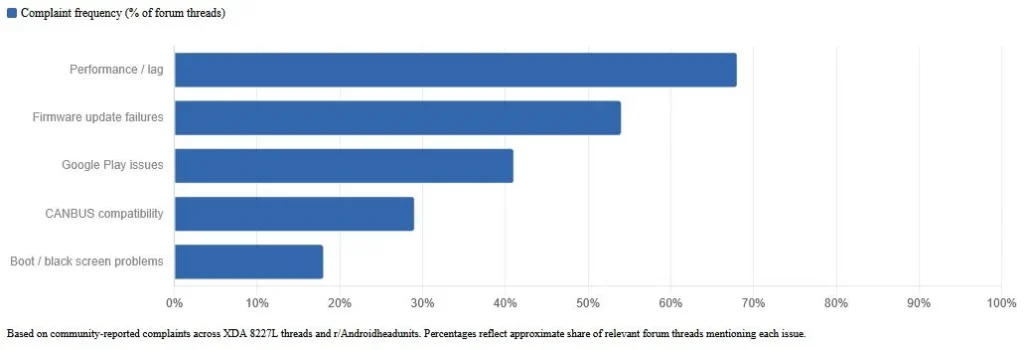
Laggy. That’s the word that comes up most on r/Androidheadunits. Not broken, not unusable, just slow in a way that gets annoying fast, especially if you’re used to a modern phone or a newer car’s infotainment system. The AC8227L chip was already mid-tier when these units launched around 2018–2020. By 2026 standards, it’s showing it’s age.
Beyond performance, here’s what owners run into:
Firmware & Updates
- No over-the-air updates. None. If you want new firmware, you find it yourself, usually on XDA’s dedicated “Collection of 8227l firmware” thread or you ask your seller directly.
- Updating requires a USB drive formatted in a very specific way and the firmware file has to match your exact build and MCU version (something like HW8227L-3.3-SW0-1.9). Get that wrong and you’ll see “upgrade file version is incorrect” or worse, a bricked unit.
- Always back up first using SP Flash Tool with the correct scatter file. Always.
Google Play & App Issues
- These aren’t Google-certified devices. That matters because Play Services can behave unpredictably Family Link blocks, sideloading restrictions, login loops. Some users get around it with workarounds, but it’s not seamless.
Other Headaches
- Factory reset can be finicky depending on the unit.
- CANBUS / steering wheel control compatibility isn’t guaranteed you need the right decoder for your car.
- Boot loops and black screens after bad firmware flashes are documented, not rare.
Buying One in the US: What You Should Know
These units are everywhere on Amazon, eBay and AliExpress prices run $80 to $250 depending on screen size and claimed specs. Many listings ship from US warehouses, so you’re looking at one to two weeks, not the six-week wait from overseas.
Installation
For most American cars, installation is straightforward:
- Pick up a universal wiring harness from Metra or Scosche these make it plug-and-play for a huge range of vehicles.
- Check your dash kit size (single DIN vs. double DIN opening).
- If you drive something like a Mercedes or another premium brand, you’ll likely need a specific CANBUS adapter (the YX2BENZ is one example mentioned in MBWorld forums) to keep your steering wheel controls and vehicle data working.
- DIY installs are common and well-documented on YouTube. If you’d rather have a shop do it, budget around $100–$200 for labor.
The Fake Specs Problem
This one’s real and worth flagging. Some listings claim higher RAM, newer Android versions or better chipsets than what’s actually inside. The only way to verify is real user photos of the “About device” screen not the listing photos, not the spec sheet. Check reviews for that specifically before buying.
Is It Legal? FCC, Warranties and State Laws
Short answer: yes, buying and installing one of these is completely legal in the US. No federal restrictions on aftermarket head units.
- FCC Compliance: Reputable listings will carry FCC IDs covering Wi-Fi, Bluetooth and FM emissions. The ultra-cheap generics sometimes cut corners here, but personal-use enforcement is essentially nonexistent. If you want to be safe, verify the FCC ID on the listing at fcc.gov/oet/ea/fccid.
- Vehicle Warranty: Technically, installing an aftermarket head unit could void infotainment-related warranty coverage. Practically, it rarely touches your powertrain or emissions warranty those are separate systems. If your car is still under warranty and this matters to you, worth a quick call to your dealer before installing.
- State Distraction Laws: Every state handles dashboard screen laws differently. The consistent rule: the screen can’t obstruct your sightline and you shouldn’t be interacting with it while driving. Many of these units support voice commands and on updated firmware wireless Android Auto, which reduces hands-on interaction. Check your state’s DMV site for specifics.
Security & Privacy: The Honest Picture
Here’s where it gets uncomfortable. A security patch level frozen at November 2017 means years of known Android vulnerabilities documented, published, unpatched sitting on a device that’s connected to your Wi-Fi and handling your Google account. That’s not a hypothetical risk. It’s just the reality of running seven-year-old firmware.
A few things worth doing if you already own one:
- Use a secondary Google account. Not your main one. Create a throwaway specifically for the head unit. This is standard advice across forums for any Chinese-sourced Android device not paranoia, just practical.
- Limit what you install. Every app is another potential vector on an unpatched OS. Keep it to navigation, music and camera apps you actually use.
- Don’t store sensitive info on the device. No banking apps, no saved passwords in browsers.
None of this makes the unit dangerous in a dramatic way millions of people use these daily without incident. But knowing what you’re working with matters, especially if the unit sits on the same home Wi-Fi as your other devices.
Pros and Cons at a Glance
No beating around it, these units have a clear use case and clear limitations. Here’s the honest breakdown:
Pros
- Cheap entry point to add navigation, Spotify, YouTube and backup camera support to an older car.
- Universal harnesses make installation accessible for DIYers.
- Some updated firmware now includes wireless Android Auto and CarPlay.
- Wide community support on XDA and Reddit means most problems have documented solutions.
Cons
- Slow by 2026 standards — the AC8227L chip wasn’t fast even at launch.
- No OTA updates, ever.
- Security patches frozen at 2017.
- Google Play Services issues are common and sometimes unfixable without workarounds.
- Fake spec listings are a real problem — what’s advertised isn’t always what ships.
- Limited long-term support; firmware development from manufacturers has largely stalled.
Should You Buy One in 2026? Alternatives Worth Considering
If you already own one of these units, it works, use it. Join r/Androidheadunits and the XDA 8227L firmware thread, keep your backup before any update and treat it as the budget tool it is.
If you’re shopping right now though, the honest answer is: there are better options at prices that aren’t dramatically higher.
Better alternatives to consider:
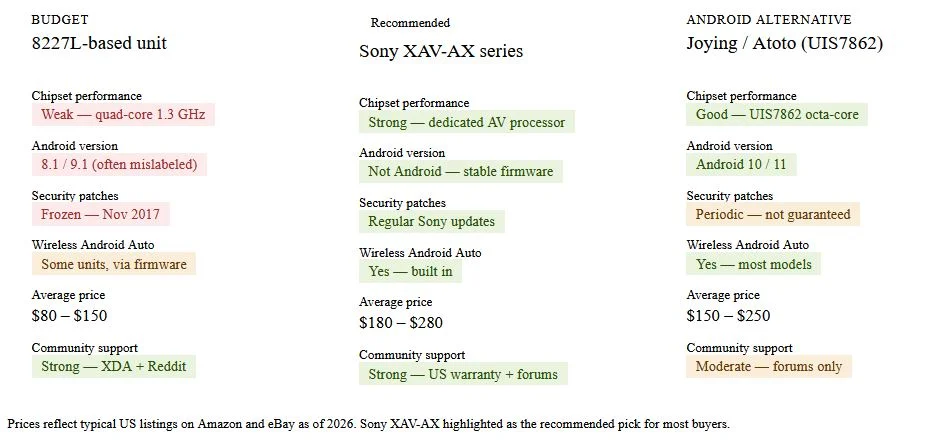
- Sony XAV-AX series — Consistently rated best all-around by US buyers. Solid build, reliable wireless Android Auto, actual customer support.
- Pioneer / Kenwood / Alpine — Premium sound quality, better long-term reliability, US warranties that mean something.
- Joying or Atoto newer chipset units — If you specifically want an Android head unit with more flexibility, these run newer chipsets like the UIS7862, more RAM and get firmware updates that the 8227L units simply won’t see.
The price gap between an 8227L unit and a Sony XAV-AX isn’t enormous — sometimes $50 to $100 difference. For most drivers, that’s worth it for the stability and security alone.